# How to store and access data from a Strapi plugin
> Source: https://docs.strapi.io/cms/plugins-development/guides/store-and-access-data
Plugin content-types store and persist data like standard content-types. Use the CLI generator to create them, then interact with data via the Document Service API or Query Engine API.
To store data with a Strapi [plugin](/cms/plugins-development/developing-plugins), use a plugin content-type. Plugin content-types work exactly like other [content-types](/cms/backend-customization/models). Once the content-type is [created](#create-a-content-type-for-your-plugin), you can start [interacting with the data](#interact-with-data-from-the-plugin).
## Create a content-type for your plugin
To create a content-type with the CLI generator, run the following command in a terminal within the `server/src/` directory of your plugin:
```bash
yarn strapi generate content-type
```
```bash
npm run strapi generate content-type
```
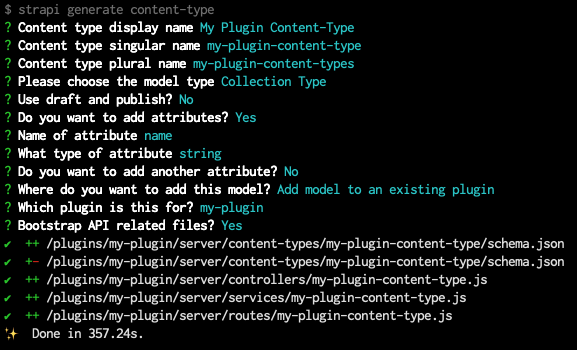
The generator CLI is interactive and asks a few questions about the content-type and the attributes it will contain. Answer the first questions, then for the `Where do you want to add this model?` question, choose the `Add model to existing plugin` option and type the name of the related plugin when asked.
The strapi generate content-type CLI generator is used to create a basic content-type for a plugin.
The CLI will generate some code required to use your plugin, which includes the following:
- the [content-type schema](/cms/backend-customization/models#model-schema)
- and a basic [controller](/cms/backend-customization/controllers), [service](/cms/backend-customization/services), and [route](/cms/backend-customization/routes) for the content-type
:::tip
You may want to create the whole structure of your content-types either entirely with the CLI generator or by directly creating and editing `schema.json` files. We recommend you first create a simple content-type with the CLI generator and then leverage the [Content-Type Builder](/cms/features/content-type-builder) in the admin panel to edit your content-type.
If your content-type is not visible in the admin panel, you might need to set the `content-manager.visible` and `content-type-builder.visible` parameters to `true` in the `pluginOptions` object of the content-type schema:
Making a plugin content-type visible in the admin panel:
The following highlighted lines in an example `schema.json` file show how to make a plugin content-type visible to the Content-Type Builder and Content-Manager:
```json title="/server/content-types/my-plugin-content-type/schema.json" {13-20} showLineNumbers
{
"kind": "collectionType",
"collectionName": "my_plugin_content_types",
"info": {
"singularName": "my-plugin-content-type",
"pluralName": "my-plugin-content-types",
"displayName": "My Plugin Content-Type"
},
"options": {
"draftAndPublish": false,
"comment": ""
},
"pluginOptions": {
"content-manager": {
"visible": true
},
"content-type-builder": {
"visible": true
}
},
"attributes": {
"name": {
"type": "string"
}
}
}
```
:::
### Ensure plugin content-types are imported
The CLI generator might not have imported all the related content-type files for your plugin, so you might have to make the following adjustments after the `strapi generate content-type` CLI command has finished running:
1. In the `/server/index.js` file, import the content-types:
```js {7,22} showLineNumbers title="/server/index.js"
'use strict';
const register = require('./register');
const bootstrap = require('./bootstrap');
const destroy = require('./destroy');
const config = require('./config');
const contentTypes = require('./content-types');
const controllers = require('./controllers');
const routes = require('./routes');
const middlewares = require('./middlewares');
const policies = require('./policies');
const services = require('./services');
module.exports = {
register,
bootstrap,
destroy,
config,
controllers,
routes,
services,
contentTypes,
policies,
middlewares,
};
```
2. In the `/server/content-types/index.js` file, import the content-type folder:
```js title="/server/content-types/index.js"
'use strict';
module.exports = {
// In the line below, replace my-plugin-content-type
// with the actual name and folder path of your content type
"my-plugin-content-type": require('./my-plugin-content-type'),
};
```
3. Ensure that the `/server/content-types/[your-content-type-name]` folder contains not only the `schema.json` file generated by the CLI, but also an `index.js` file that exports the content-type with the following code:
```js title="/server/content-types/my-plugin-content-type/index.js
'use strict';
const schema = require('./schema');
module.exports = {
schema,
};
```
## Interact with data from the plugin
Once you have created a content-type for your plugin, you can create, read, update, and delete data.
:::note
A plugin can only interact with data from the `/server` folder. If you need to update data from the admin panel, please refer to the [passing data guide](/cms/plugins-development/guides/pass-data-from-server-to-admin).
:::
To create, read, update, and delete data, you can use either the [Document Service API](/cms/api/document-service) or the [Query Engine API](/cms/api/query-engine). While it's recommended to use the Document Service API, especially if you need access to components or dynamic zones, the Query Engine API is useful if you need unrestricted access to the underlying database.
Use the `plugin::your-plugin-slug.the-plugin-content-type-name` syntax for content-type identifiers in Document Service and Query Engine API queries.
**Example:**
Here is how to find all the entries for the `my-plugin-content-type` collection type created for a plugin called `my-plugin`:
```js
// Using the Document Service API
let data = await strapi.documents('plugin::my-plugin.my-plugin-content-type').findMany();
// Using the Query Engine API
let data = await strapi.db.query('plugin::my-plugin.my-plugin-content-type').findMany();
````
:::tip
You can access the database via the `strapi` object which can be found in `middlewares`, `policies`, `controllers`, `services`, as well as from the `register`, `boostrap`, `destroy` lifecycle functions.
:::