# Command Line Interface

> Source: https://docs.strapi.io/cms/cli

Strapi comes with a full featured Command Line Interface (CLI) which lets you scaffold and manage your project in seconds. The CLI works with both the `yarn` and `npm` package managers.

Strapi CLI commands on the present page are grouped by category:

| Category | Commands |
|---|---|
| [Development](#development) | `develop`, `start`, `build`, `console` |
| [Cloud](#cloud) | `login`, `logout`, `deploy` |
| [Data management](#data-management) | `export`, `import`, `transfer` |
| [Project information](#project-information) | `report`, `telemetry:disable`, `telemetry:enable`, `version`, `help` |
| [Configuration](#configuration) | `configuration:dump`, `configuration:restore` |
| [Administration](#administration) | `admin:create-user`, `admin:reset-user-password`, `admin:list-users`, `admin:active-user`, `admin:block-user`, `admin:delete-user` |
| [Code generation](#code-generation) | `generate`, `openapi generate`, `templates:generate`, `ts:generate-types` |
| [Listing](#listing) | `routes:list`, `policies:list`, `middlewares:list`, `content-types:list`, `hooks:list`, `controllers:list`, `services:list` |

:::caution
Interactive commands such as `strapi admin:create-user` don't display prompts with `npm`. Please consider using the `yarn` package manager.
:::

## General considerations

It is recommended to install Strapi locally only, which requires prefixing all of the following `strapi` commands with the package manager used for the project setup (e.g `npm run strapi help` or `yarn strapi help`) or a dedicated node package executor (e.g. `npx strapi help`).

:::note The format for passing options differs between npm and yarn

* To pass options with `npm` use the following syntax:<br/>
   `npm run strapi <command> -- --<option>`.

* To pass options with `yarn` use the following syntax:<br/>
   `yarn strapi <command> --<option>`
:::

<details>
<summary>ℹ️ Strapi v4 CLI commands removed from Strapi 5:</summary>

The `strapi install`, `strapi uninstall`, `strapi new`, and `strapi watch-admin` commands from Strapi v4 have been removed in Strapi 5:

| Strapi v4 command         | Strapi 5 equivalent                                                                                                                                                                                |
| ------------------------- | -------------------------------------------------------------------------------------------------------------------------------------------------------------------------------------------------- |
| `strapi install [plugin]` | Use the npx command corresponding to the plugin (found on the Marketplace, see [Marketplace](/cms/plugins/installing-plugins-via-marketplace))                                                     |
| `strapi new`              | Use the equivalent yarn or npx command to create a new Strapi project (see [CLI installation guide](/cms/installation/cli))                                                                        |
| `strapi watch-admin`      | `yarn develop` or `npm run develop` always starts the Strapi server in "watch-admin" mode. To disable this in Strapi 5, run `yarn develop --no-watch-admin` or `npm run develop --no-watch-admin`. |

</details>

## Development

These commands start and build your Strapi application during development.

### `strapi develop`

**Alias**: `dev`

Start a Strapi application with auto-reloading enabled.

Strapi modifies/creates files at runtime and needs to restart when new files are created. To achieve this, `strapi develop` adds a file watcher and restarts the application when necessary.

Strapi also adds middlewares to support HMR (Hot Module Replacement) for the administration panel. This allows you to customize the administration panel without having to restart the application or run a separate server.

```shell
strapi develop
options: [--bundler | --open | --no-watch-admin | --no-build-admin | --polling | --debug | --silent]
```

- **strapi develop --bundler [bundler]**<br/>
  Selects the bundler for the admin panel build (`vite` or `webpack`).
- **strapi develop --open**<br/>
  Starts your application with auto-reloading enabled & open your default browser with the administration panel running.
- **strapi develop --no-watch-admin**<br/>
  Prevents the server from auto-reload when changes are made to the admin panel code.
- **strapi develop --no-build-admin**<br/>
  Prevents the admin panel from being built when `--no-watch-admin` is enabled.
- **strapi develop --polling**<br/>
  Watches for file changes in network directories.
- **strapi develop --debug**<br/>
  Enables debugging mode with verbose logs.
- **strapi develop --silent**<br/>
  Suppresses logs.
- **strapi develop --install-deps**<br/>
  Auto-installs missing admin peer dependencies (`react`, `react-dom`, `react-router-dom`, `styled-components`). This is enabled by default.
- **strapi develop --no-install-deps**<br/>
  Skips auto-installation of missing admin peer dependencies and fails immediately if any are missing.

:::warning
You should never use this command to run a Strapi application in production.
:::

### `strapi start`

Start a Strapi application with auto-reloading disabled.

This command is to run a Strapi application without restarts and file writes, primarily for use in production.
Certain features such as the Content-type Builder are disabled in the `strapi start` mode because they require application restarts. The `start` command can be prefaced with [environment variables](/cms/configurations/environment#strapi) to customize the application start.

### `strapi build`

Builds your admin panel.

```bash
strapi build
```

| Option              | Type | Description                                              |
| ------------------- | :--: | -------------------------------------------------------- |
| `-d, --debug`        |  -   | Enable debugging mode with verbose logs (default: false) |
| `--minify`           |  -   | Minify the output (default: true)                        |
| `--no-optimization`  |  -   | [DEPRECATED]: use minify instead                         |
| `--silent`           |  -   | Don't log anything (default: false)                      |
| `--sourcemaps`       |  -   | Produce sourcemaps (default: false)                      |
| `--stats`            |  -   | Print build statistics to the console (default: false)   |
| `--install-deps`     |  -   | Auto-installs missing admin peer dependencies (default: false) |
| `--no-install-deps`  |  -   | Skips auto-installation and fails if dependencies are missing (default: true) |

### `strapi console`

Start the server and evaluate commands in your application in real time.

```bash
strapi console
```

The `console` command compiles and loads your application, starts the server in the background, then opens a Node.js [REPL](https://en.wikipedia.org/wiki/Read%E2%80%93eval%E2%80%93print_loop). The REPL provides a prompt based on your application's name and gives access to all Strapi APIs through the global `strapi` object. Closing the REPL by pressing `Ctrl-C` twice gracefully stops the server.

#### Available helpers

The `strapi` object exposes the following getters and methods to interact with your application:

- `strapi.services` and `strapi.service(uid)` to use [services](/cms/backend-customization/services)
- `strapi.controllers` and `strapi.controller(uid)` to call [controllers](/cms/backend-customization/controllers)
- `strapi.contentTypes` and `strapi.contentType(uid)` to inspect [content-types](/cms/backend-customization/models)
- `strapi.components` to list components
- `strapi.policies` and `strapi.policy(name)` for [policies](/cms/backend-customization/policies)
- `strapi.middlewares` and `strapi.middleware(name)` for [middlewares](/cms/backend-customization/middlewares)
- `strapi.plugins` and `strapi.plugin(name)` for plugins
- `strapi.hooks` and `strapi.hook(name)` for hooks
- `strapi.apis` and `strapi.api(name)` for APIs
- `strapi.db` to directly query the database through the [Query Engine API](/cms/api/query-engine), for example as follows:<br/><br/>
  ```js
  await strapi.db.query('api::article.article').findMany();
  ```

Use this environment to test code and inspect your project with direct access to all Strapi APIs.

:::note
Strapi uses a Node.js feature called [AsyncLocalStorage](https://nodejs.org/api/async_context.html) to make the context available anywhere.
:::

## Cloud

These commands interact with Strapi Cloud. See the [Cloud CLI](/cloud/cli/cloud-cli) documentation for details.

### `strapi login`

Logs in to Strapi Cloud (see [Cloud CLI](/cloud/cli/cloud-cli#strapi-login) documentation).

### `strapi logout`

Logs out from Strapi Cloud (see [Cloud CLI](/cloud/cli/cloud-cli#strapi-logout) documentation).

### `strapi deploy`

Deploys to Strapi Cloud (see [Cloud CLI](/cloud/cli/cloud-cli#strapi-deploy) documentation).

## Data management

These commands export, import, and transfer data between Strapi instances.

### `strapi export`

[Exports your project data](/cms/features/data-management). The default settings create a `.tar` file, compressed using `gzip` and encrypted using `aes-128-ecb`.

```bash
strapi export
```

The archive contains folders such as `configuration`, `entities`, `links`, and `schemas` with data stored in [JSON lines](https://jsonlines.org/) files. Use `--no-encrypt --no-compress` to generate a readable `.tar` that can be inspected or converted to other formats.

The exported file is automatically named using the format `export_YYYYMMDDHHMMSS` with the current date and timestamp. Alternately, you can specify the filename using the `-f` or `--file` flag. The following table provides all of the available options as command line flags:

| Option              |  Type  | Description                                                                                                                |
| ------------------- | :----: | -------------------------------------------------------------------------------------------------------------------------- |
| `--no-encrypt`      |   -    | Disables file encryption and disables the `key` option.                                                                    |
| `--no-compress`     |   -    | Disables file compression.                                                                                                 |
| `-k`, <br/>`--key`  | string | Passes the encryption key as part of the `export` command. <br/> The `--key` option can't be combined with `--no-encrypt`. |
| `-f`, <br/>`--file` | string | Specifies the export filename (tar) or output directory path (dir). Do not include a file extension for tar exports.       |
| `--format`          | string | Export format: `tar` (default) or `dir`. Directory exports require `--no-encrypt`.                                         |
| `--exclude`         | string | Exclude data using comma-separated data types. The available types are: `content`, `files`, and `config`.                  |
| `--only`            | string | Include only these data. The available types are: `content`, `files`, and `config`.                                        |
| `-h`, <br/>`--help` |   -    | Displays help for the `strapi export` command.                                                                             |

**Examples**

Export data with a custom filename (`myData.tar.gz.enc`):

```bash
strapi export -f myData
```

Export data without encryption:

```bash
strapi export --no-encrypt
```

Export data as an unpacked directory:

```bash
strapi export --format dir --no-encrypt -f my-export
```

### `strapi import`

[Imports data](/cms/features/data-management) into your project. The imported data must originate from another Strapi application. You must pass the `--file` option to specify the file or directory for the import action.

```bash
strapi import
```

The command accepts archives generated by `strapi export` (`.tar`, `.tar.gz`, `.tar.gz.enc`) and unpacked export directories. Compression and encryption are detected from the filename for archive imports. When `-f` points to a directory, encryption and compression are skipped automatically.

| Option         | Type   | Description                                                                           |
| -------------- | ------ | ------------------------------------------------------------------------------------- |
| `-k,` `--key`  | string | Provide the encryption key in the command instead of a subsequent prompt.             |
| `-f`, `--file` | string | Path to a `.tar[.gz][.enc]` archive or to an unpacked export directory.               |
| `-h`, `--help` | -      | Display the `strapi import` help commands.                                            |

**Examples**

Import data and pass an encryption key:

```bash
strapi import -f your-filepath-and-filename --key my-key
```

Import from an unpacked export directory:

```bash
strapi import -f ./my-export
```

### `strapi transfer`

[Transfers data](/cms/data-management/transfer) between 2 Strapi instances. This command is primarily intended for use between a local instance and a remote instance or 2 remote instances. The `transfer` command requires a Transfer token, which is generated in the destination instance Admin panel. See the [User Guide](/cms/features/data-management#admin-panel-settings) for detailed documentation on creating Transfer tokens.

:::caution
The destination Strapi instance should be running with the `start` command and not the `develop` command.
:::

| Option                       | Description                                                                                                                                       |
| ---------------------------- | ------------------------------------------------------------------------------------------------------------------------------------------------- |
| `--to [destinationURL]`      | Full URL of the `/admin` endpoint on the destination Strapi instance<br />(e.g. `--to https://my-beautiful-strapi-website/admin`)                 |
| `--to-token [transferToken]` | Transfer token for the remote Strapi destination                                                                                                  |
| `--from [sourceURL]`         | Full URL of the `/admin` endpoint of the remote Strapi instance to pull data from<br />(e.g., `--from https://my-beautiful-strapi-website/admin`) |
| `‑‑from‑token`               | Transfer token from the Strapi source instance.                                                                                                   |
| `--force`                    | Automatically answer "yes" to all prompts, including potentially destructive requests, and run non-interactively.                                 |
| `--exclude`                  | Exclude data using comma-separated data types. The available types are: `content`, `files`, and `config`.                                         |
| `--only`                     | Include only these data. The available types are: `content`, `files`, and `config`.                                                               |
| `-h`, `--help`               | Displays the commands for `strapi transfer`.                                                                                                      |

:::caution
Either `--to` or `--from` is required, but it's not currently allowed to enter both or neither.
:::

**Example**

```bash
strapi transfer --to http://example.com/admin --to-token my-transfer-token
```

## Project information

These commands display project details, manage telemetry, and show the installed version.

### `strapi report`

Prints out debug information useful for debugging and required when reporting an issue.

| Option                 | Description                   |
| ---------------------- | ----------------------------- |
| `-u`, `--uuid`         | Includes the project UUID     |
| `-d`, `--dependencies` | Includes project dependencies |
| `--all`                | Logs all the data             |

**Examples**

To include the project UUID and dependencies in the output:

```bash
strapi report --uuid --dependencies
```

To log everything, use the `--all` option:

```bash
strapi report --all
```

### `strapi telemetry:disable`

Disable data collection for the project (see [Usage Information](/cms/usage-information)).

```bash
strapi telemetry:disable
```

### `strapi telemetry:enable`

Re-enable data collection for the project after it was disabled (see [Usage Information](/cms/usage-information)).

```bash
strapi telemetry:enable
```

### `strapi version`

Print the currently installed Strapi version.
It will output the current globally installed version if this command is strapi is installed globally, or the current version of Strapi within a Strapi project if the command is run from a given folder containing a Strapi project.

```bash
strapi version
```

### `strapi help`

List CLI commands.

```bash
strapi help
```

## Configuration

These commands dump and restore your application's stored configuration.

### `strapi configuration:dump`

**Alias**: `config:dump`

Dumps configurations to a file or stdout to help you migrate to production.

The dump format will be a JSON array.

```bash title="strapi configuration:dump"

Options:
  -f, --file <file>  Output file, default output is stdout
  -p, --pretty       Format the output JSON with indentation and line breaks (default: false)
```

**Examples**

- `strapi configuration:dump -f dump.json`
- `strapi config:dump --file dump.json`
- `strapi config:dump > dump.json`

All these examples are equivalent.

:::caution
When configuring your application you often enter credentials for third party services (e.g authentication providers). Be aware that those credentials will also be dumped into the output of this command.
In case of doubt, you should avoid committing the dump file into a versioning system. Here are some methods you can explore:

- Copy the file directly to the environment you want and run the restore command there.
- Put the file in a secure location and download it at deploy time with the right credentials.
- Encrypt the file before committing and decrypt it when running the restore command.

:::

### `strapi configuration:restore`

**Alias**: `config:restore`

Restores a configuration dump into your application.

The input format must be a JSON array.

```bash
strapi configuration:restore

Options:
  -f, --file <file>          Input file, default input is stdin
  -s, --strategy <strategy>  Strategy name, one of: "replace", "merge", "keep". Defaults to: "replace"
```

**Examples**

- `strapi configuration:restore -f dump.json`
- `strapi config:restore --file dump.json -s replace`
- `cat dump.json | strapi config:restore`
- `strapi config:restore < dump.json`

All these examples are equivalent.

**Strategies**

When running the restore command, you can choose from three different strategies:

- **replace**: Will create missing keys and replace existing ones.
- **merge**: Will create missing keys and merge existing keys with their new value.
- **keep**: Will create missing keys and keep existing keys as is.

## Administration

These commands manage administrator accounts for the Strapi admin panel.

### `strapi admin:create-user`

**Alias** `admin:create`

Creates an administrator.
Administrator's first name, last name, email, and password can be:

- passed as options
- or set interactively if you call the command without passing any option.

**Example**

```bash

strapi admin:create-user --firstname=Kai --lastname=Doe --email=chef@strapi.io --password=Gourmet1234
```

**Options**

| Option          | Type   | Description                        | Required |
| --------------- | ------ | ---------------------------------- | -------- |
| -f, --firstname | string | The administrator's first name     | Yes      |
| -l, --lastname  | string | The administrator's last name      | No       |
| -e, --email     | string | The administrator's email          | Yes      |
| -p, --password  | string | New password for the administrator | No       |
| -h, --help      |        | display help for command           | No       |

### `strapi admin:reset-user-password`

**Alias** `admin:reset-password`

Reset an admin user's password.
You can pass the email and new password as options or set them interactively if you call the command without passing the options.

**Example**

```bash

strapi admin:reset-user-password --email=chef@strapi.io --password=Gourmet1234
```

**Options**

| Option         | Type   | Description               |
| -------------- | ------ | ------------------------- |
| -e, --email    | string | The user email            |
| -p, --password | string | New password for the user |
| -h, --help     |        | display help for command  |

### `strapi admin:list-users`

**Alias** `admin:list`

Displays a table listing all administrator accounts, including their ID, email, first and last name, active status, blocked status, and assigned roles.

```bash
strapi admin:list-users
```

### `strapi admin:active-user`

**Alias** `admin:active`

Sets the active status of an administrator account. The email and active status can be passed as options or provided interactively if you call the command without options.

**Example**

```bash
strapi admin:active-user --email=chef@strapi.io --active=true
```

**Options**

| Option       | Type   | Description                                  | Required |
| ------------ | ------ | -------------------------------------------- | -------- |
| -e, --email  | string | The administrator's email                    | Yes      |
| -a, --active | string | The active status to set (`true` or `false`) | Yes      |
| -h, --help   |        | display help for command                     | No       |

### `strapi admin:block-user`

**Alias** `admin:block`

Sets the blocked status of an administrator account. The email and block status can be passed as options or provided interactively if you call the command without options.

**Example**

```bash
strapi admin:block-user --email=chef@strapi.io --block=true
```

**Options**

| Option      | Type   | Description                                   | Required |
| ----------- | ------ | --------------------------------------------- | -------- |
| -e, --email | string | The administrator's email                     | Yes      |
| -b, --block | string | The blocked status to set (`true` or `false`) | Yes      |
| -h, --help  |        | display help for command                      | No       |

### `strapi admin:delete-user`

**Alias** `admin:delete`

Deletes an existing administrator account. The email can be passed as an option or provided interactively if you call the command without options. An interactive confirmation prompt is shown before deletion.

**Example**

```bash
strapi admin:delete-user --email=chef@strapi.io
```

**Options**

| Option          | Type   | Description                   | Required |
| --------------- | ------ | ----------------------------- | -------- |
| -e, --email     | string | The administrator's email     | Yes      |
| -h, --help      |        | display help for command      | No       |

## Code generation

These commands scaffold APIs, content-types, and other project files.

### `strapi generate`

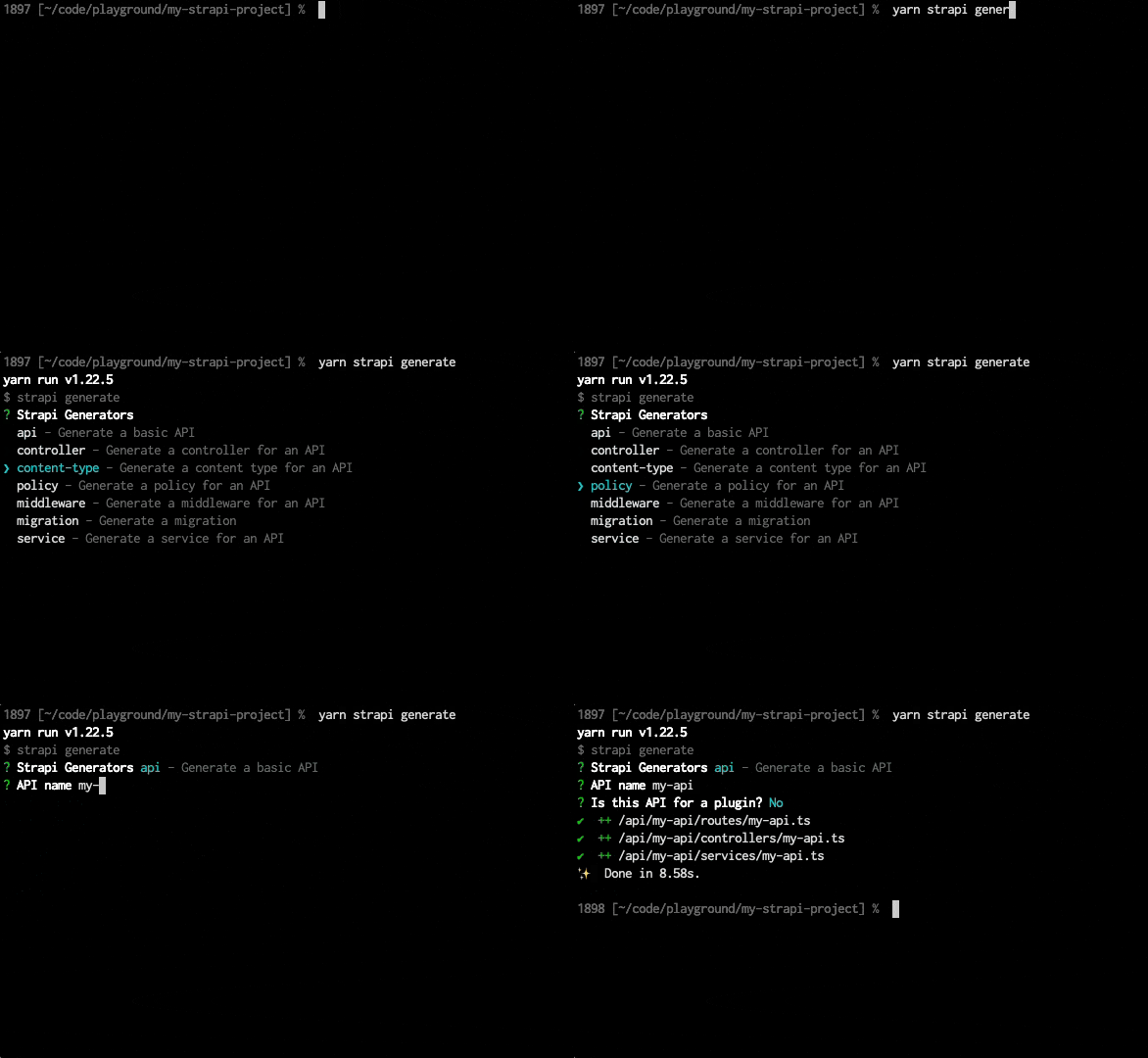
Generate APIs, [controllers](/cms/backend-customization/controllers), [content-types](/cms/backend-customization/models), [policies](/cms/backend-customization/policies), [middlewares](/cms/backend-customization/middlewares), [services](/cms/backend-customization/services), and [migrations](/cms/database-migrations).

```bash
strapi generate
```

The command displays an interactive menu with the following options:

- **api** - Generate a new API with controller and service
- **controller** - Generate a new controller
- **content-type** - Generate a new content type with schema
- **policy** - Generate a new policy
- **middleware** - Generate a new middleware
- **migration** - Generate a new database migration
- **service** - Generate a new service
![strapi generate GIF](/img/assets/cli/strapi-generate.gif)

The generator detects TypeScript or JavaScript automatically and creates files with the correct extension (`.ts` or `.js`).
Generated files include commented examples. Singular and plural names must be different and use **kebab-case format** .

<ExpandableContent maxHeight="120px" showMoreText="Show more…" showLessText="Show less">

#### API generator

Creates an API with [controller](/cms/backend-customization/controllers) and [service](/cms/backend-customization/services) files.

**Generated file:** `controllers/[name].js|ts`, `services/[name].js|ts`, and `routes/[name].js|ts` (standard APIs only)

#### Content-type generator

Creates a content type schema with optional API files.

##### Available attribute types

| Type          | Description        |
| ------------- | ------------------ |
| `string`      | Short text         |
| `text`        | Long text          |
| `richtext`    | Rich text editor   |
| `email`       | Email field        |
| `password`    | Password field     |
| `integer`     | Whole number       |
| `biginteger`  | Large whole number |
| `float`       | Decimal number     |
| `decimal`     | Precise decimal    |
| `date`        | Date only          |
| `time`        | Time only          |
| `datetime`    | Date and time      |
| `timestamp`   | Unix timestamp     |
| `boolean`     | True/false         |
| `json`        | JSON data          |
| `enumeration` | Predefined values  |
| `media`       | File upload        |

##### Generated files

| Condition          | Generated files                                                                                                                                          |
| ------------------ | -------------------------------------------------------------------------------------------------------------------------------------------------------- |
| Content type only  | `content-types/[name]/schema.json`                                                                                                                       |
| With API bootstrap | <ul><li>`content-types/[name]/schema.json`</li><li>`controllers/[name].js\|ts`</li><li>`services/[name].js\|ts`</li><li>`routes/[name].js\|ts`</li></ul> |

#### Controller generator

Creates a [controller](/cms/backend-customization/controllers) file with basic action structure.

**Generated file:** `controllers/[name].js|ts`

#### Service generator

Creates a [service](/cms/backend-customization/services) file with basic structure.

**Generated file:** `services/[name].js|ts`

#### Policy generator

Creates a [policy](/cms/backend-customization/policies) file for access control.

**Generated file:** `policies/[name].js|ts`

#### Middleware generator

Creates a [middleware](/cms/backend-customization/middlewares) file for request processing.

**Generated file:** `middlewares/[name].js|ts`

#### Migration generator

Creates a timestamped [migration](/cms/database-migrations) file.

**Generated file:** `database/migrations/[timestamp].[name].js|ts`

#### Configuration options

The `strapi generate` interactive CLI may offer various configuration options depending on the chosen Strapi element to generate:

##### Destination choices

When creating a content-type, controller, policy, middleware, or service, you can choose its destination:

| Option              | Description                                          |
| ------------------- | ---------------------------------------------------- |
| **New API**         | Creates a new API folder                             |
| **Existing API**    | Adds to existing API folder                          |
| **Existing plugin** | Adds to existing plugin folder                       |
| **Root**            | Adds to project root (policies and middlewares only) |

##### Content-type specific options

When creating a content-type, you can choose to create a collection type or a single type (see [Content-Type Builder](/cms/features/content-type-builder) documentation for differences):

| Type                | Description          | Example            |
| ------------------- | -------------------- | ------------------ |
| **Collection Type** | For multiple entries | Articles, users    |
| **Single Type**     | For a single entry   | Homepage, settings |

You will also have to define various types of names. The following table explains their differences. Only the display name needs to be manually defined, and you can press Enter to accept the default suggested name for the singular and plural names. Singular and plural names matter for API endpoints (see [REST API](/cms/api/rest#endpoints) documentation for details):

| Field             | Format         | Description               | Example    |
| ----------------- | -------------- | ------------------------- | ---------- |
| **Display name**  | Human-readable | Name shown in admin panel | Blog Post  |
| **Singular name** | Kebab-case     | Used for API endpoints    | blog-post  |
| **Plural name**   | Kebab-case     | Used for collections      | blog-posts |

### `strapi openapi generate`

[Generate OpenAPI specifications](/cms/api/openapi) for your Strapi application.

```bash
strapi openapi generate
```

| Option     | Type     | Default               | Description                                      |
| ---------- | -------- | --------------------- | ------------------------------------------------ |
| `--output` | `string` | `./openapi-spec.json` | Output file path for the generated specification |

#### Examples

```bash
# Generate OpenAPI specification (default)
yarn strapi openapi generate

# Generate with custom output path
yarn strapi openapi generate --output ./docs/api-spec.json
```
```bash
# Generate OpenAPI specification (default)
npm run strapi openapi generate

# Generate with custom output path
npm run strapi openapi generate -- --output ./docs/api-spec.json
```

### `strapi templates:generate`

Create a template from the current Strapi project.

```bash
strapi templates:generate <path>
```

- **strapi templates:generate &#60;path&#62;**<br/>
  Generates a Strapi template at `<path>`

  Example: `strapi templates:generate ../strapi-template-name` will copy the required files and folders to a `template` directory inside `../strapi-template-name`

### `strapi ts:generate-types`

Generate [TypeScript](/cms/typescript) typings for the project schemas.

```bash
strapi ts:generate-types
```

- **strapi ts:generate-types --debug**<br />
  Generate typings with the debug mode enabled, displaying a detailed table of the generated schemas.
- **strapi ts:generate-types --silent** or **strapi ts:generate-types -s**<br/>
  Generate typings with the silent mode enabled, completely removing all the logs in the terminal. Cannot be combined with `debug`
- **strapi ts:generate-types --out-dir &#60;path&#62;** or **strapi ts:generate-types -o &#60;path&#62;**<br/>
  Generate typings specifying the output directory in which the file will be created.

:::caution
Strapi requires the project types to be generated in the `types` directory for them to work. The `--out-dir` option should not be used for most cases. However, it can be useful for cases such as generating a second copy to compare the difference between your existing and updated types after changing your content structure.
:::

## Listing

These commands list registered elements in your Strapi project.

### `strapi routes:list`

Display a list of all the available [routes](/cms/backend-customization/routes).

```bash
strapi routes:list
```

### `strapi policies:list`

Display a list of all the registered [policies](/cms/backend-customization/policies).

```bash
strapi policies:list
```

### `strapi middlewares:list`

Display a list of all the registered [middlewares](/cms/backend-customization/middlewares).

```bash
strapi middlewares:list
```

### `strapi content-types:list`

Display a list of all the existing [content-types](/cms/backend-customization/models).

```bash
strapi content-types:list
```

### `strapi hooks:list`

Display a list of all the available hooks.

```bash
strapi hooks:list
```

### `strapi controllers:list`

Display a list of all the registered [controllers](/cms/backend-customization/controllers).

```bash
strapi controllers:list
```

### `strapi services:list`

Display a list of all the registered [services](/cms/backend-customization/services).

```bash
strapi services:list
```
