# Routes
> Source: https://docs.strapi.io/cms/backend-customization/routes
Routes map incoming URLs to controllers and ship pre-generated for each content type. This documentation shows how to add or customize core and custom routers and attach policies or middlewares for extra control.
Requests sent to Strapi on any URL are handled by routes. By default, Strapi generates routes for all the content-types (see [REST API documentation](/cms/api/rest)). Routes can be [added](#implementation) and configured:
- with [policies](#policies), which are a way to block access to a route,
- and with [middlewares](#middlewares), which are a way to control and change the request flow and the request itself.
Once a route exists, reaching it executes some code handled by a controller (see [controllers documentation](/cms/backend-customization/controllers)). To view all existing routes and their hierarchal order, you can run `yarn strapi routes:list` (see [CLI reference](/cms/cli)).
:::tip
If you only customize the default controller actions (`find`, `findOne`, `create`, `update`, or `delete`) that Strapi generates for a content-type, you can leave the router as-is. Those core routes already target the same handler names and will run your new controller logic. Add or edit a route only when you need a brand-new HTTP path/method or want to expose a custom controller action.
:::
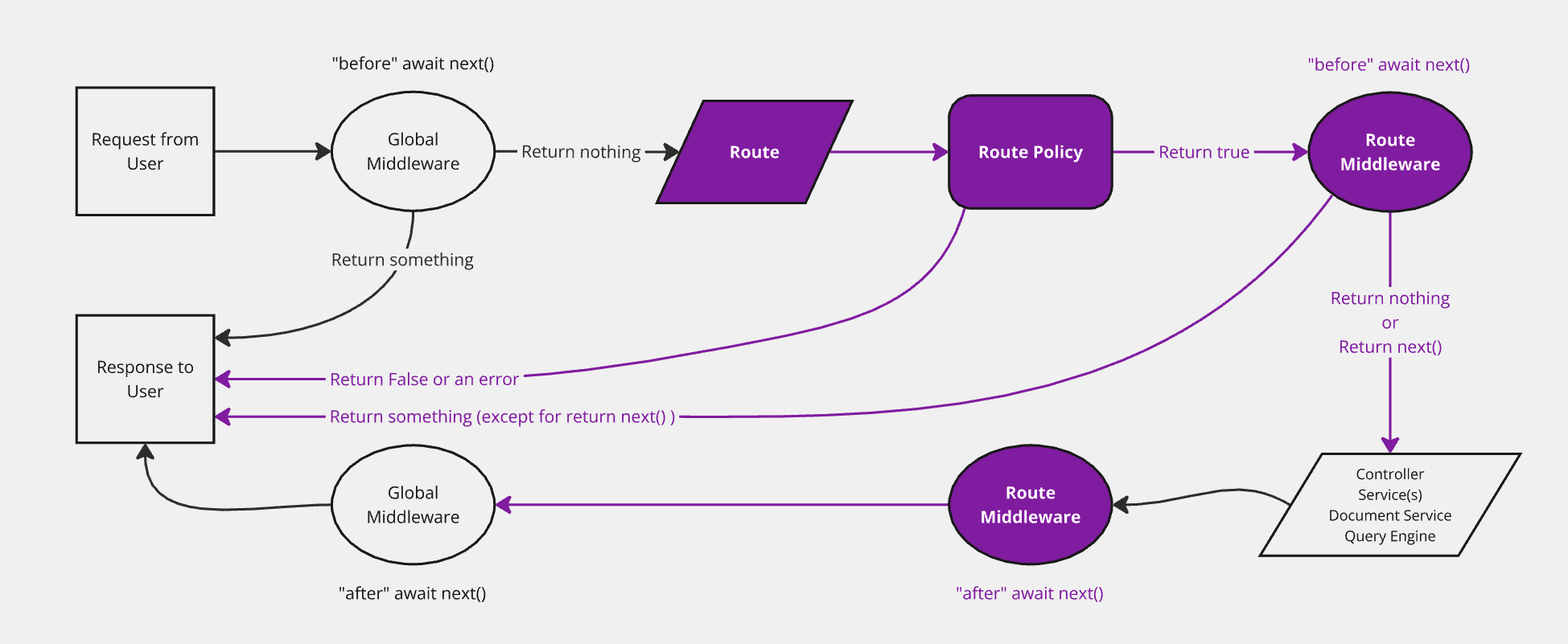
The diagram represents a simplified version of how a request travels through the Strapi back end, with routes highlighted. The backend customization introduction page includes a complete, interactive diagram.
## Implementation
Implementing a new route consists in defining it in a router file within the `./src/api/[apiName]/routes` folder (see [project structure](/cms/project-structure)).
There are 2 different router file structures, depending on the use case:
- configuring [core routers](#configuring-core-routers)
- or creating [custom routers](#creating-custom-routers).
### Configuring core routers
Core routers (i.e. `find`, `findOne`, `create`, `update`, and `delete`) correspond to [default routes](/cms/api/rest#endpoints) automatically created by Strapi when a new [content-type](/cms/backend-customization/models#model-creation) is created.
Strapi provides a `createCoreRouter` factory function that automatically generates the core routers and allows:
- passing in configuration options to each router
- and disabling some core routers to [create custom ones](#creating-custom-routers).
A core router file is a JavaScript file exporting the result of a call to `createCoreRouter` with the following parameters:
| Parameter | Description | Type |
| ----------| -------------------------------------------------------------------------------------------- | -------- |
| `prefix` | Allows passing in a custom prefix to add to all routers for this model (e.g. `/test`) | `String` |
| `only` | Core routes that will only be loaded
Anything not in this array is ignored. | `Array` | -->
| `except` | Core routes that should not be loaded
This is functionally the opposite of the `only` parameter. | `Array` |
| `config` | Configuration to handle [policies](#policies), [middlewares](#middlewares) and [public availability](#public-routes) for the route | `Object` |
```js title="./src/api/[apiName]/routes/[routerName].js (e.g './src/api/restaurant/routes/restaurant.js')"
const { createCoreRouter } = require('@strapi/strapi').factories;
module.exports = createCoreRouter('api::restaurant.restaurant', {
prefix: '',
only: ['find', 'findOne'],
except: [],
config: {
find: {
auth: false,
policies: [],
middlewares: [],
},
findOne: {},
create: {},
update: {},
delete: {},
},
});
```
```ts title="./src/api/[apiName]/routes/[routerName].ts (e.g './src/api/restaurant/routes/restaurant.ts')"
prefix: '',
only: ['find', 'findOne'],
except: [],
config: {
find: {
auth: false,
policies: [],
middlewares: [],
},
findOne: {},
create: {},
update: {},
delete: {},
},
});
```
Generic implementation example:
```js title="./src/api/restaurant/routes/restaurant.js"
const { createCoreRouter } = require('@strapi/strapi').factories;
module.exports = createCoreRouter('api::restaurant.restaurant', {
only: ['find'],
config: {
find: {
auth: false,
policies: [],
middlewares: [],
}
}
});
```
```ts title="./src/api/restaurant/routes/restaurant.ts"
only: ['find'],
config: {
find: {
auth: false,
policies: [],
middlewares: [],
}
}
});
```
This only allows a `GET` request on the `/restaurants` path from the core `find` [controller](/cms/backend-customization/controllers) without authentication. When you reference custom controller actions in custom routers, prefer the fully-qualified `api::..` form for clarity (e.g., `api::restaurant.restaurant.review`).
### Creating custom routers
Creating custom routers consists in creating a file that exports an array of objects, each object being a route with the following parameters:
| Parameter | Description | Type |
| -------------------------- | -------------------------------------------------------------------------------- | -------- |
| `method` | Method associated to the route (i.e. `GET`, `POST`, `PUT`, `DELETE` or `PATCH`) | `String` |
| `path` | Path to reach, starting with a forward-leading slash (e.g. `/articles`)| `String` |
| `handler` | Function to execute when the route is reached. Use the fully-qualified syntax `api::api-name.controllerName.actionName` (or `plugin::plugin-name.controllerName.actionName`). The short `.` form for legacy projects also works. | `String` |
| `config`
_Optional_ | Configuration to handle [policies](#policies), [middlewares](#middlewares) and [public availability](#public-routes) for the route
| `Object` |
Dynamic routes can be created using parameters and regular expressions. These parameters will be exposed in the `ctx.params` object. For more details, please refer to the [PathToRegex](https://github.com/pillarjs/path-to-regexp) documentation.
:::caution
Routes files are loaded in alphabetical order. To load custom routes before core routes, make sure to name custom routes appropriately (e.g. `01-custom-routes.js` and `02-core-routes.js`).
:::
:::info Controller handler naming reference
The `handler` string acts as a pointer to the controller action that should run for the route. Strapi supports the following formats:
- API controllers: `api::..` (e.g. `api::restaurant.restaurant.exampleAction`). The `` comes from the controller filename inside `./src/api//controllers/`.
- Plugin controllers: `plugin::..` when the controller lives in a plugin.
For backwards compatibility, Strapi also accepts a short `.` string for API controllers, but using the fully-qualified form makes the route more explicit and avoids naming collisions across APIs and plugins.
:::
Example of a custom router using URL parameters and regular expressions for routes
In the following example, the custom routes file name is prefixed with `01-` to make sure the route is reached before the core routes.
```js title="./src/api/restaurant/routes/01-custom-restaurant.js"
/** @type {import('@strapi/strapi').Core.RouterConfig} */
const config = {
type: 'content-api',
routes: [
{ // Path defined with an URL parameter
method: 'POST',
path: '/restaurants/:id/review',
handler: 'api::restaurant.restaurant.review',
},
{ // Path defined with a regular expression
method: 'GET',
path: '/restaurants/:category([a-z]+)', // Only match when the URL parameter is composed of lowercase letters
handler: 'api::restaurant.restaurant.findByCategory',
}
]
}
module.exports = config
```
```js title="./src/api/restaurant/routes/01-custom-restaurant.ts"
const config: Core.RouterConfig = {
type: 'content-api',
routes: [
{ // Path defined with a URL parameter
method: 'GET',
path: '/restaurants/:category/:id',
handler: 'api::restaurant.restaurant.findOneByCategory',
},
{ // Path defined with a regular expression
method: 'GET',
path: '/restaurants/:region(\\d{2}|\\d{3})/:id', // Only match when the first parameter contains 2 or 3 digits.
handler: 'api::restaurant.restaurant.findOneByRegion',
}
]
}
```
## Configuration
Both [core routers](#configuring-core-routers) and [custom routers](#creating-custom-routers) have the same configuration options. The routes configuration is defined in a `config` object that can be used to handle [policies](#policies) and [middlewares](#middlewares) or to [make the route public](#public-routes).
### Policies
[Policies](/cms/backend-customization/policies) can be added to a route configuration:
- by pointing to a policy registered in `./src/policies`, with or without passing a custom configuration
- or by declaring the policy implementation directly, as a function that takes `policyContext` to extend [Koa](https://koajs.com/#context) (`ctx`) and the `strapi` instance as arguments (see [policies documentation](/cms/backend-customization/routes))
```js title="./src/api/restaurant/routes/restaurant.js"
const { createCoreRouter } = require('@strapi/strapi').factories;
module.exports = createCoreRouter('api::restaurant.restaurant', {
config: {
find: {
policies: [
// point to a registered policy
'policy-name',
// point to a registered policy with some custom configuration
{ name: 'policy-name', config: {} },
// pass a policy implementation directly
(policyContext, config, { strapi }) => {
return true;
},
]
}
}
});
```
```js title="./src/api/restaurant/routes/restaurant.ts"
config: {
find: {
policies: [
// point to a registered policy
'policy-name',
// point to a registered policy with some custom configuration
{ name: 'policy-name', config: {} },
// pass a policy implementation directly
(policyContext, config, { strapi }) => {
return true;
},
]
}
}
});
```
```js title="./src/api/restaurant/routes/custom-restaurant.js"
module.exports = {
routes: [
{
method: 'GET',
path: '/articles/customRoute',
handler: 'api::api-name.controllerName.functionName', // or 'plugin::plugin-name.controllerName.functionName' for a plugin-specific controller
config: {
policies: [
// point to a registered policy
'policy-name',
// point to a registered policy with some custom configuration
{ name: 'policy-name', config: {} },
// pass a policy implementation directly
(policyContext, config, { strapi }) => {
return true;
},
]
},
},
],
};
```
```js title="./src/api/restaurant/routes/custom-restaurant.ts"
routes: [
{
method: 'GET',
path: '/articles/customRoute',
handler: 'api::api-name.controllerName.functionName', // or 'plugin::plugin-name.controllerName.functionName' for a plugin-specific controller
config: {
policies: [
// point to a registered policy
'policy-name',
// point to a registered policy with some custom configuration
{ name: 'policy-name', config: {} },
// pass a policy implementation directly
(policyContext, config, { strapi }) => {
return true;
},
]
},
},
],
};
```
### Middlewares
[Middlewares](/cms/backend-customization/middlewares) can be added to a route configuration:
- by pointing to a middleware registered in `./src/middlewares`, with or without passing a custom configuration
- or by declaring the middleware implementation directly, as a function that takes [Koa](https://koajs.com/#context) (`ctx`) and the `strapi` instance as arguments:
```js title="./src/api/restaurant/routes/restaurant.js"
const { createCoreRouter } = require('@strapi/strapi').factories;
module.exports = createCoreRouter('api::restaurant.restaurant', {
config: {
find: {
middlewares: [
// point to a registered middleware
'middleware-name',
// point to a registered middleware with some custom configuration
{ name: 'middleware-name', config: {} },
// pass a middleware implementation directly
(ctx, next) => {
return next();
},
]
}
}
});
```
```js title="./src/api/restaurant/routes/restaurant.ts"
config: {
find: {
middlewares: [
// point to a registered middleware
'middleware-name',
// point to a registered middleware with some custom configuration
{ name: 'middleware-name', config: {} },
// pass a middleware implementation directly
(ctx, next) => {
return next();
},
]
}
}
});
```
```js title="./src/api/restaurant/routes/custom-restaurant.js"
module.exports = {
routes: [
{
method: 'GET',
path: '/articles/customRoute',
handler: 'api::api-name.controllerName.functionName', // or 'plugin::plugin-name.controllerName.functionName' for a plugin-specific controller
config: {
middlewares: [
// point to a registered middleware
'middleware-name',
// point to a registered middleware with some custom configuration
{ name: 'middleware-name', config: {} },
// pass a middleware implementation directly
(ctx, next) => {
return next();
},
],
},
},
],
};
```
```js title="./src/api/restaurant/routes/custom-restaurant.ts"
routes: [
{
method: 'GET',
path: '/articles/customRoute',
handler: 'api::api-name.controllerName.functionName', // or 'plugin::plugin-name.controllerName.functionName' for a plugin-specific controller
config: {
middlewares: [
// point to a registered middleware
'middleware-name',
// point to a registered middleware with some custom configuration
{ name: 'middleware-name', config: {} },
// pass a middleware implementation directly
(ctx, next) => {
return next();
},
],
},
},
],
};
```
Applying middlewares to all core routes of a content-type
`createCoreRouter` attaches `middlewares` per action. To run the same middleware on every default Content API action (`find`, `findOne`, `create`, `update`, `delete`), list it under each key in `config`, or build the object once:
```js title="./src/api/restaurant/routes/restaurant.js"
const { createCoreRouter } = require('@strapi/strapi').factories;
const audit = ['global::audit-log'];
const actions = ['find', 'findOne', 'create', 'update', 'delete'];
module.exports = createCoreRouter('api::restaurant.restaurant', {
config: Object.fromEntries(actions.map((action) => [action, { middlewares: audit }])),
});
```
```ts title="./src/api/restaurant/routes/restaurant.ts"
const audit = ['global::audit-log'] as const;
const actions = ['find', 'findOne', 'create', 'update', 'delete'] as const;
config: Object.fromEntries(actions.map((action) => [action, { middlewares: [...audit] }])),
});
```
If you use `only` or `except`, build the `actions` array to match the routes you actually register so you do not attach middlewares to disabled handlers.
:::tip Centralizing population logic
Route-level middlewares are the recommended place to enforce consistent population rules across your API. This prevents accidental over-fetching and ensures predictable response sizes. See [Building High-Performance Strapi Applications](https://strapi.io/blog/building-high-performance-strapi-applications-common-pitfalls-and-best-practices) on the Strapi blog.
:::
### Public routes
By default, routes are protected by Strapi's authentication system, which is based on [API tokens](/cms/features/api-tokens) or on the use of the [Users & Permissions plugin](/cms/features/users-permissions).
In some scenarios, it can be useful to have a route publicly available and control the access outside of the normal Strapi authentication system. This can be achieved by setting the `auth` configuration parameter of a route to `false`:
```js title="./src/api/restaurant/routes/restaurant.js"
const { createCoreRouter } = require('@strapi/strapi').factories;
module.exports = createCoreRouter('api::restaurant.restaurant', {
config: {
find: {
auth: false
}
}
});
```
```js title="./src/api/restaurant/routes/restaurant.ts"
config: {
find: {
auth: false
}
}
});
```
```js title="./src/api/restaurant/routes/custom-restaurant.js"
module.exports = {
routes: [
{
method: 'GET',
path: '/articles/customRoute',
handler: 'api::api-name.controllerName.functionName', // or 'plugin::plugin-name.controllerName.functionName' for a plugin-specific controller
config: {
auth: false,
},
},
],
};
```
```js title="./src/api/restaurant/routes/custom-restaurant.ts"
routes: [
{
method: 'GET',
path: '/articles/customRoute',
handler: 'api::api-name.controllerName.functionName', // or 'plugin::plugin-name.controllerName.functionName' for a plugin-specific controller
config: {
auth: false,
},
},
],
};
```
## Custom Content API parameters {#custom-content-api-parameters}
You can extend the `query` and body parameters allowed on Content API routes by registering them in the [register](/cms/configurations/functions#register) lifecycle. Registered parameters are then validated and sanitized like core parameters. Clients can send extra query keys (e.g. `?search=...`) or root-level body keys (e.g. `clientMutationId`) without requiring custom routes or controllers.
| What | Where |
|------|--------|
| Enable strict parameters (reject unknown query/body keys) | [API configuration](/cms/configurations/api): set `rest.strictParams: true` in `./config/api.js` (or `./config/api.ts`). |
| Add allowed parameters (app) | Call `addQueryParams` / `addInputParams` in [register](/cms/configurations/functions#register) in `./src/index.js` or `./src/index.ts`. |
| Add allowed parameters (plugin) | Call `addQueryParams` / `addInputParams` in the plugin's [register](/cms/plugins-development/server-lifecycle#register) lifecycle. |
When `rest.strictParams` is enabled, only core parameters and parameters on each route's request schema are accepted; the parameters you register are merged into that schema. Use the `z` instance from `@strapi/utils` (or `zod/v4`) for schemas.
### `addQueryParams`
`strapi.contentAPI.addQueryParams(options)` registers extra `query` parameters. Schemas must be scalar or array-of-scalars (string, number, boolean, enum). For nested structures, use `addInputParams` instead. Each entry can have an optional `matchRoute: (route) => boolean` callback to add the parameter only to routes for which the callback returns true. You cannot register core query param names (e.g. `filters`, `sort`, `fields`) as extra params; they are reserved.
### `addInputParams`
`strapi.contentAPI.addInputParams(options)` registers extra input parameters: root-level keys in the request body (e.g. alongside `data`), with any Zod type. The optional `matchRoute` callback works the same way as for `addQueryParams`. You cannot register reserved names such as `id` or `documentId` as input params.
### `matchRoute`
The `matchRoute` callback receives a `route` object with the following properties:
- `route.method`: the HTTP method (`'GET'`, `'POST'`, etc.)
- `route.path`: the route path
- `route.handler`: the controller action string
- `route.info`: metadata about the route
For example, to target only GET routes, use `matchRoute: (route) => route.method === 'GET'`. To target only routes whose path includes `articles`, use `matchRoute: (route) => route.path.includes('articles')`.
```js title="./src/index.js"
module.exports = {
register({ strapi }) {
strapi.contentAPI.addQueryParams({
search: {
schema: (z) => z.string().max(200).optional(),
matchRoute: (route) => route.path.includes('articles'),
},
});
strapi.contentAPI.addInputParams({
clientMutationId: {
schema: (z) => z.string().max(100).optional(),
},
});
},
};
```
```ts title="./src/index.ts"
register({ strapi }) {
strapi.contentAPI.addQueryParams({
search: {
schema: (z) => z.string().max(200).optional(),
matchRoute: (route) => route.path.includes('articles'),
},
});
strapi.contentAPI.addInputParams({
clientMutationId: {
schema: (z) => z.string().max(100).optional(),
},
});
},
};
```