# Requests and Responses
> Source: https://docs.strapi.io/cms/backend-customization/requests-responses
Koa’s context (`ctx`) carries request info, state, and response data through every Strapi endpoint. This documentation details `ctx.request`, `ctx.state`, and `ctx.response`, plus a helper for accessing context anywhere.
The Strapi back end server is based on [Koa](https://koajs.com/). When you send requests through the [REST API](/cms/api/rest), a context object (`ctx`) is passed to every element of the Strapi back end (e.g., [policies](/cms/backend-customization/policies), [controllers](/cms/backend-customization/controllers), [services](/cms/backend-customization/services)).
`ctx` includes 3 main objects:
- [`ctx.request`](#ctxrequest) for information about the request sent by the client making an API request,
- [`ctx.state`](#ctxstate) for information about the state of the request within the Strapi back end,
- and [`ctx.response`](#ctxresponse) for information about the response that the server will return.
:::tip
The request's context can also be accessed from anywhere in the code with the [`strapi.requestContext` function](#accessing-the-request-context-anywhere).
:::
:::info
In addition to the concepts and parameters described in the following documentation, you might find additional information in the [Koa request documentation](http://koajs.com/#request), [Koa Router documentation](https://github.com/koajs/router/blob/master/API.md) and [Koa response documentation](http://koajs.com/#response).
:::
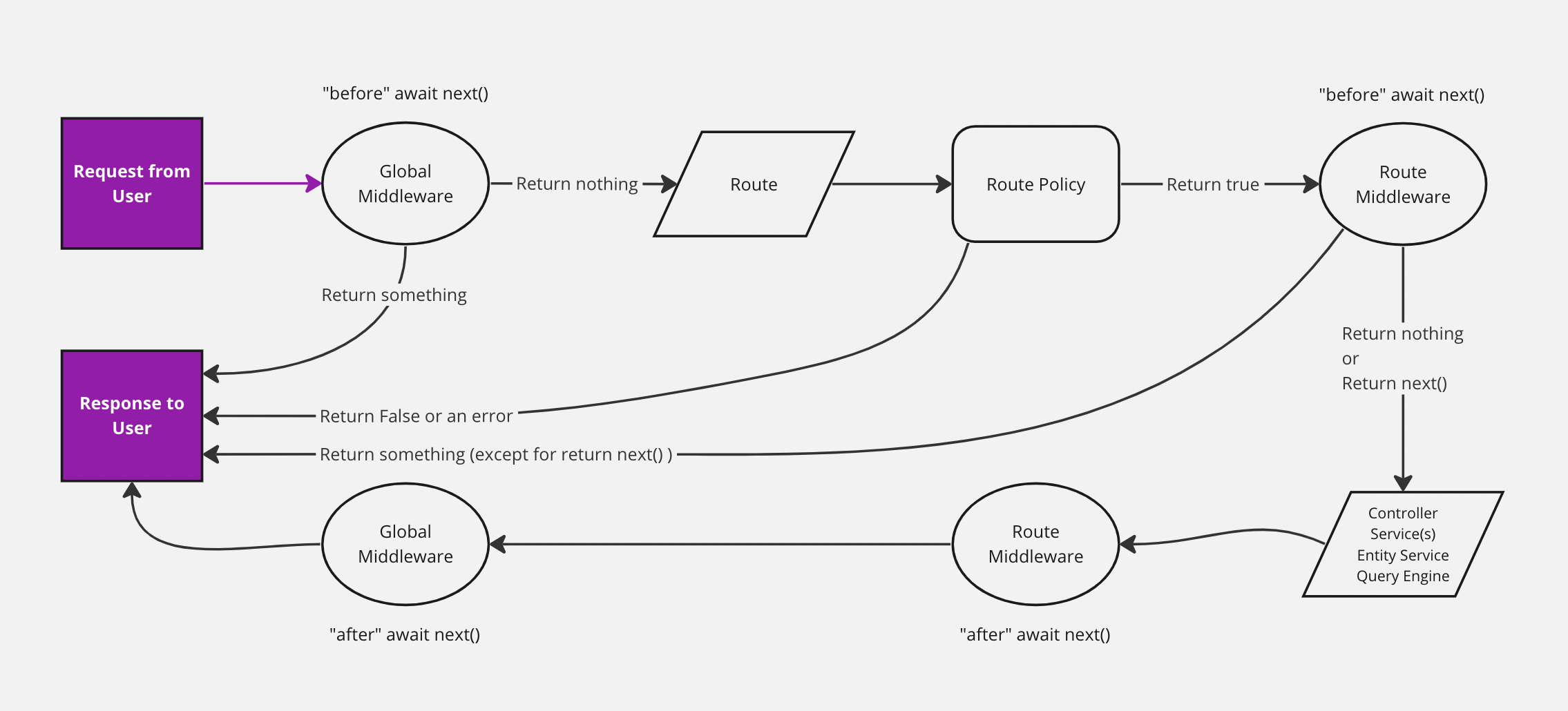
The diagram represents a simplified version of how a request travels through the Strapi back end, with requests and responses highlighted. The backend customization introduction page includes a complete, interactive diagram.
## `ctx.request`
The `ctx.request` object contains the following parameters:
| Parameter | Description | Type |
| --------------------- | -------------------------------------------------------------------------------------------- | -------- |
| `ctx.request.body` | Parsed version of the body. | `Object` |
| `ctx.request.files` | Files sent with the request. | `Array` |
| `ctx.request.headers` | Headers sent with the request. | `Object` |
| `ctx.request.host` | Host part of the URL, including the port. | `String` |
| `ctx.request.hostname`| Host part of the URL, excluding the port. | `String` |
| `ctx.request.href` | Complete URL of the requested resource, including the protocol, domain, port (if specified), path, and query parameters. | `String` |
| `ctx.request.ip` | IP of the person sending the request.| `String` |
| `ctx.request.ips` | When `X-Forwarded-For` is present and `app.proxy` is enabled, an array of IPs is returned, ordered from upstream to downstream.
For example if the value were "client, proxy1, proxy2", you would receive the `["client", "proxy1", "proxy2"]` array. | `Array` |
| `ctx.request.method` | Request method (e.g., `GET`, `POST`). | `String` |
| `ctx.request.origin` | URL part before the first `/`. | `String` |
| `ctx.request.params` | Parameters sent in the URL.
For example, if the internal URL is `/restaurants/:id`, whatever you replace `:id` in the real request becomes accessible through `ctx.request.params.id`. | `Object` |
| `ctx.request.path` | Path of the requested resource, excluding the query parameters. | `String` |
| `ctx.request.protocol`| Protocol being used (e.g., `https` or `http`). | `String` |
| `ctx.request.query` | Strapi-specific [query parameters](#ctxrequestquery). | `Object` |
| `ctx.request.subdomains`| Subdomains included in the URL.
For example, if the domain is `tobi.ferrets.example.com`, the value is the following array: `["ferrets", "tobi"]`. | `Array` |
| `ctx.request.url` | Path and query parameters of the requested resource, excluding the protocol, domain, and port. | `String` |
Differences between protocol, origin, url, href, path, host, and hostname :
Given an API request sent to the `https://example.com:1337/api/restaurants?id=123` URL, here is what different parameters of the `ctx.request` object return:
| Parameter | Returned value |
| ---------- | ------------------------------------------------- |
| `ctx.request.href` | `https://example.com:1337/api/restaurants?id=123` |
| `ctx.request.protocol` | `https` |
| `ctx.request.host` | `localhost:1337` |
| `ctx.request.hostname` | `localhost` |
| `ctx.request.origin` | `https://example.com:1337` |
| `ctx.request.url` | `/api/restaurants?id=123` |
| `ctx.request.path` | `/api/restaurants` |
### `ctx.request.query`
`ctx.request` provides a `query` object that gives access to Strapi query parameters. The following table lists available parameters with a short description and a link to the relevant REST API documentation section (see [REST API parameters](/cms/api/rest/parameters) for more information):
| Parameter | Description | Type |
| -------------------------------------| --------------------------------------------------------------------------------------------------------------------------- | -------------------- |
| `ctx.request.query` `ctx.query` | The whole query object. | `Object` |
| `ctx.request.query.sort` | Parameters to [sort the response](/cms/api/rest/sort-pagination.md#sorting) | `String` or `Array` |
| `ctx.request.query.filters` | Parameters to [filter the response](/cms/api/rest/filters) | `Object` |
| `ctx.request.query.populate` | Parameters to [populate relations, components, or dynamic zones](/cms/api/rest/populate-select#population) | `String` or `Object` |
| `ctx.request.query.fields` | Parameters to [select only specific fields to return with the response](/cms/api/rest/populate-select#field-selection) | `Array` |
| `ctx.request.query.pagination` | Parameter to [page through entries](/cms/api/rest/sort-pagination.md#pagination) | `Object` |
| `ctx.request.query.publicationState` | Parameter to [select the Draft & Publish state](/cms/api/rest/status) | `String` |
| `ctx.request.query.locale` | Parameter to [select one or multiple locales](/cms/api/rest/locale) | `String` or `Array` |
## `ctx.state`
The `ctx.state` object gives access to the state of the request within the Strapi back end, including specific values about the [user](#ctxstateuser), [authentication](#ctxstateauth), [route](#ctxstateroute):
| Parameter | Description | Type |
| ---------------------------|---------------------------------------------------------------------------- | -------- |
| `ctx.state.isAuthenticated`| Returns whether the current user is authenticated in any way. | `Boolean` |
### `ctx.state.user`
The `ctx.state.user` object gives access to information about the user performing the request and includes the following parameters:
| Parameter | Description | Type |
| ----------| -------------------------------------------------------------------------------------------- | -------- |
| `ctx.state.user`| User's information. Only one relation is populated. | `Object` |
| `ctx.state.user.role`| The user's role | `Object` |
### `ctx.state.auth`
The `ctx.state.auth` object gives access to information related to the authentication and includes the following parameters:
| Parameter | Description | Type |
| ------------------------------| -------------------------------------------------------------------------------------------- | -------- |
| `ctx.state.auth.strategy` | Information about the currently used authentication strategy ([Users & Permissions plugin](/cms/features/users-permissions) or [API tokens](/cms/features/api-tokens)) | `Object` |
| `ctx.state.auth.strategy.name`| Name of the currently used strategy | `String` |
| `ctx.state.auth.credentials` | The user's credentials | `String` |
### `ctx.state.route`
The `ctx.state.route` object gives access to information related to the current route and includes the following parameters:
| Parameter | Description | Type |
| ----------| -------------------------------------------------------------------------------------------- | -------- |
| `ctx.state.route.method`| Method used to access the current route. | `String` |
| `ctx.state.route.path`| Path of the current route. | `String` |
| `ctx.state.route.config`| Configuration information about the current route. | `Object` |
| `ctx.state.route.handler`| Handler (controller) of the current route. | `Object` |
| `ctx.state.route.info`| Additional information about the current route, such as the apiName and the API request type. | `Object` |
| `ctx.state.route.info.apiName`| Name of the used API. | `String` |
| `ctx.state.route.info.type`| Type of the used API. | `String` |
## `ctx.response`
The `ctx.response` object gives access to information related to the response that the server will return and includes the following parameters:
| Parameter | Description | Type |
| ----------| -------------------------------------------------------------------------------------------- | -------- |
| `ctx.response.body`| Body of the response. | `Any` |
| `ctx.response.status` | Status code of the response. | `Integer` |
| `ctx.response.message`| Status message of the response.
By default, `response.message` is associated with `response.status`. | `String` |
| `ctx.response.header` `ctx.response.headers`| Header(s) sent with the response. | `Object` |
| `ctx.response.length`| [`Content-Length`](https://developer.mozilla.org/en-US/docs/Web/HTTP/Headers/Content-Length) header value as a number when present, or deduces it from `ctx.body` when possible; otherwise, returns `undefined`. | `Integer` |
| `ctx.response.redirect` `ctx.response.redirect(url, [alt])` | Performs a `302` redirect to the URL. The string "back" is special-cased to provide Referrer support; when Referrer is not present, alt or "/" is used.
`ctx.response.attachment([filename], [options])` | Sets [`Content-Disposition`](https://developer.mozilla.org/en-US/docs/Web/HTTP/Headers/Content-Disposition) header to "attachment" to signal the client to prompt for download. Optionally specify the filename of the download and some [options](https://github.com/jshttp/content-disposition#options). | `Function` |
| `ctx.response.type`| [`Content-Type`](https://developer.mozilla.org/en-US/docs/Web/HTTP/Headers/Content-Type) header, void of parameters such as "charset". | `String` |
| `ctx.response.lastModified`| [`Last-Modified`](https://developer.mozilla.org/en-US/docs/Web/HTTP/Headers/Last-Modified) header as a Date, if it exists. | `DateTime` |
| `ctx.response.etag`| Sets the [`ETag`](https://developer.mozilla.org/en-US/docs/Web/HTTP/Headers/ETag) of a response including the wrapped "s. There is no corresponding `response.etag` getter. | `String` |
## Accessing the request context anywhere
Strapi exposes a way to access the current request context from anywhere in the code (e.g. lifecycle functions).
You can access the request as follows:
```js
const ctx = strapi.requestContext.get();
```
You should only use this inside of functions that will be called in the context of an HTTP request.
```js
// correct
const service = {
myFunction() {
const ctx = strapi.requestContext.get();
console.log(ctx.state.user);
},
};
// incorrect
const ctx = strapi.requestContext.get();
const service = {
myFunction() {
console.log(ctx.state.user);
},
};
```
**Example:**
```js title="./api/test/content-types/article/lifecycles.js"
module.exports = {
beforeUpdate() {
const ctx = strapi.requestContext.get();
console.log('User info in service: ', ctx.state.user);
},
};
```
:::note
Strapi uses a Node.js feature called [AsyncLocalStorage](https://nodejs.org/docs/latest-v16.x/api/async_context.html#class-asynclocalstorage) to make the context available anywhere.
:::
:::tip
For making authenticated HTTP requests from the admin panel in plugins, see [Admin Panel API: Fetch client](/cms/plugins-development/admin-fetch-client).
:::