# Middlewares
> Source: https://docs.strapi.io/cms/backend-customization/middlewares
Middlewares alter the request or response flow at application or API levels. This documentation distinguishes global versus route middlewares and illustrates custom implementations with generation patterns.
:::strapi Different types of middlewares
In Strapi, 3 middleware concepts coexist:
- **Global middlewares** are [configured and enabled](/cms/configurations/middlewares) for the entire Strapi server application. These middlewares can be applied at the application level or at the API level. The present documentation describes how to implement them. Plugins can also add global middlewares (see [Server API documentation](/cms/plugins-development/server-api)).
- **Route middlewares** have a more limited scope and are configured and used as middlewares at the route level. They are described in the [routes documentation](/cms/backend-customization/routes#middlewares).
- **Document Service middlewares** apply to the Document Service API and have their own [implementation](/cms/api/document-service/middlewares) and related [lifecycle hooks](/cms/migration/v4-to-v5/breaking-changes/lifecycle-hooks-document-service#table).
:::
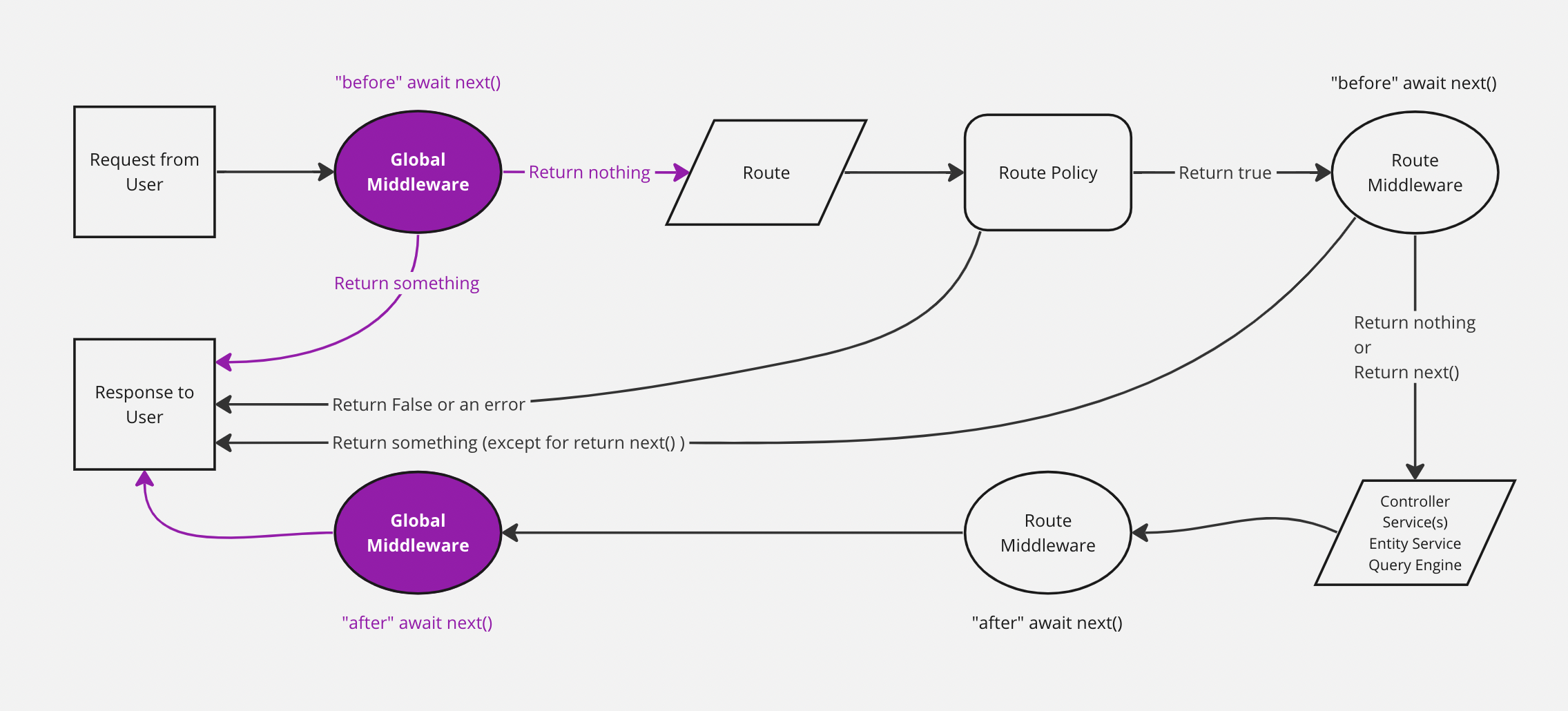
The diagram represents a simplified version of how a request travels through the Strapi back end, with global middlewares highlighted. The backend customization introduction page includes a complete, interactive diagram.
## Implementation
A new application-level or API-level middleware can be implemented:
- with the [interactive CLI command `strapi generate`](/cms/cli#strapi-generate)
- or manually by creating a JavaScript file in the appropriate folder (see [project structure](/cms/project-structure)):
- `./src/middlewares/` for application-level middlewares
- `./src/api/[api-name]/middlewares/` for API-level middlewares
- `./src/plugins/[plugin-name]/middlewares/` for [plugin middlewares](/cms/plugins-development/server-policies-middlewares)
Middlewares working with the REST API are functions like the following:
```js title="./src/middlewares/my-middleware.js or ./src/api/[api-name]/middlewares/my-middleware.js"
module.exports = (config, { strapi })=> {
return (context, next) => {};
};
```
```js title="./src/middlewares/my-middleware.js or ./src/api/[api-name]/middlewares/my-middleware.ts"
return (context, next) => {};
};
```
Globally scoped custom middlewares should be added to the [middlewares configuration file](/cms/configurations/middlewares#loading-order) or Strapi won't load them.
API level and plugin middlewares can be added into the specific router that they are relevant to like the following:
```js title="./src/api/[api-name]/routes/[collection-name].js or ./src/plugins/[plugin-name]/server/routes/index.js"
module.exports = {
routes: [
{
method: "GET",
path: "/[collection-name]",
handler: "[controller].find",
config: {
middlewares: ["[middleware-name]"],
// See the usage section below for middleware naming conventions
},
},
],
};
```
Example of a custom timer middleware
```js title="/config/middlewares.js"
module.exports = () => {
return async (ctx, next) => {
const start = Date.now();
await next();
const delta = Math.ceil(Date.now() - start);
ctx.set('X-Response-Time', delta + 'ms');
};
};
```
```ts title="/config/middlewares.ts"
return async (ctx, next) => {
const start = Date.now();
await next();
const delta = Math.ceil(Date.now() - start);
ctx.set('X-Response-Time', delta + 'ms');
};
};
```
The GraphQL plugin also allows [implementing custom middlewares](/cms/plugins/graphql#middlewares), with a different syntax.
:::tip Discover loaded middlewares
Run `yarn strapi middlewares:list` to list all registered middlewares and double‑check naming when wiring them in routers.
:::
## Usage
Middlewares are called different ways depending on their scope:
- use `global::middleware-name` for application-level middlewares
- use `api::api-name.middleware-name` for API-level middlewares
- use `plugin::plugin-name.middleware-name` for plugin middlewares
:::tip
To list all the registered middlewares, run `yarn strapi middlewares:list`.
:::
### Restricting content access with an "is-owner policy"
It is often required that the author of an entry is the only user allowed to edit or delete the entry. In previous versions of Strapi, this was known as an "is-owner policy". With Strapi v4, the recommended way to achieve this behavior is to use a middleware.
Proper implementation largely depends on your project's needs and custom code, but the most basic implementation could be achieved with the following procedure:
1. From your project's folder, create a middleware with the Strapi CLI generator, by running the `yarn strapi generate` (or `npm run strapi generate`) command in the terminal.
2. Select `middleware` from the list, using keyboard arrows, and press Enter.
3. Give the middleware a name, for instance `isOwner`.
4. Choose `Add middleware to an existing API` from the list.
5. Select which API you want the middleware to apply.
6. Replace the code in the `/src/api/[your-api-name]/middlewares/isOwner.js` file with the following, replacing `api::restaurant.restaurant` in line 22 with the identifier corresponding to the API you choose at step 5 (e.g., `api::blog-post.blog-post` if your API name is `blog-post`):
```js showLineNumbers title="src/api/blog-post/middlewares/isOwner.js"
"use strict";
/**
* `isOwner` middleware
*/
module.exports = (config, { strapi }) => {
// Add your own logic here.
return async (ctx, next) => {
const user = ctx.state.user;
const entryId = ctx.params.id ? ctx.params.id : undefined;
let entry = {};
/**
* Gets all information about a given entry,
* populating every relations to ensure
* the response includes author-related information
*/
if (entryId) {
entry = await strapi.documents('api::restaurant.restaurant').findOne(
entryId,
{ populate: "*" }
);
}
/**
* Compares user id and entry author id
* to decide whether the request can be fulfilled
* by going forward in the Strapi backend server
*/
if (user.id !== entry.author.id) {
return ctx.unauthorized("This action is unauthorized.");
} else {
return next();
}
};
};
```
7. Ensure the middleware is configured to apply on some routes. In the `config` object found in the `src/api/[your-api–name]/routes/[your-content-type-name].js` file, define the action keys (`find`, `findOne`, `create`, `update`, `delete`, etc.) for which you would like the middleware to apply, and declare the `isOwner` middleware for these routes.
For instance, if you wish to allow GET requests (mapping to the `find` and `findOne` actions) and POST requests (i.e., the `create` action) to any user for the `restaurant` content-type in the `restaurant` API, but would like to restrict PUT (i.e., `update` action) and DELETE requests only to the user who created the entry, you could use the following code in the `src/api/restaurant/routes/restaurant.js` file:
```js title="src/api/restaurant/routes/restaurant.js"
/**
* restaurant router
*/
const { createCoreRouter } = require("@strapi/strapi").factories;
module.exports = createCoreRouter("api::restaurant.restaurant", {
config: {
update: {
middlewares: ["api::restaurant.is-owner"],
},
delete: {
middlewares: ["api::restaurant.is-owner"],
},
},
});
```
:::info
You can find more information about route middlewares in the [routes documentation](/cms/backend-customization/routes).
:::
:::tip Middlewares for performance
Route-level middlewares are a good place to centralize population logic and prevent accidental over-fetching. See [Building High-Performance Strapi Applications](https://strapi.io/blog/building-high-performance-strapi-applications-common-pitfalls-and-best-practices) on the Strapi blog for patterns and examples.
:::