# Custom services and controllers
> Source: https://docs.strapi.io/cms/backend-customization/examples/services-and-controllers
Services encapsulate reusable business logic that controllers invoke to handle reviews and email notifications. This guide demonstrates creating custom services using the Document Service API and custom controllers that call them.
:::callout 🏗 About these examples
These examples are built around [FoodAdvisor](https://github.com/strapi/foodadvisor), which is no longer Strapi's featured demo application (it has been superseded by [LaunchPad](https://github.com/strapi/LaunchPad)). What matters here is understanding the backend mechanisms being demonstrated, not FoodAdvisor itself. These pages will be revisited to use LaunchPad.
:::
:::prerequisites
This page is part of the back end customization examples cookbook. Please ensure you've read its [introduction](/cms/backend-customization/examples).
:::
From the front-end website of [FoodAdvisor](https://github.com/strapi/foodadvisor), you can browse a list of restaurants accessible at [`localhost:3000/restaurants`](http://localhost:3000/restaurants). Clicking on any restaurant from the list will use the code included in the `/client` folder to display additional information about this restaurant. The content displayed on a restaurant page was created within Strapi's Content Manager and is retrieved by querying Strapi's REST API which uses code included in the `/api` folder.
This page will teach about the following advanced topics:
| Topic | Section |
|------|---------|
| Create a component that interacts with the backend of Strapi | [REST API queries from the front-end](#rest-api-queries-from-the-front-end) |
| Understand how services and controllers can play together | [Controllers vs. services](#controllers-vs-services) |
| Create custom services |
A [custom service](#custom-service-creating-a-review) that only uses the Document Service API
Another more [advanced custom service](#custom-service-sending-an-email-to-the-restaurant-owner) that uses both the Document Service API and a Strapi plugin
|
| Use services in a controller | [Custom controller](#custom-controller) |
### REST API queries from the front end
**💭 Context:**
Restaurant pages on the front-end website of [FoodAdvisor](https://github.com/strapi/foodadvisor) include a Reviews section that is read-only. Adding reviews requires logging in to Strapi's admin panel and adding content to the "Reviews" collection type through the [Content Manager](/cms/features/content-manager).
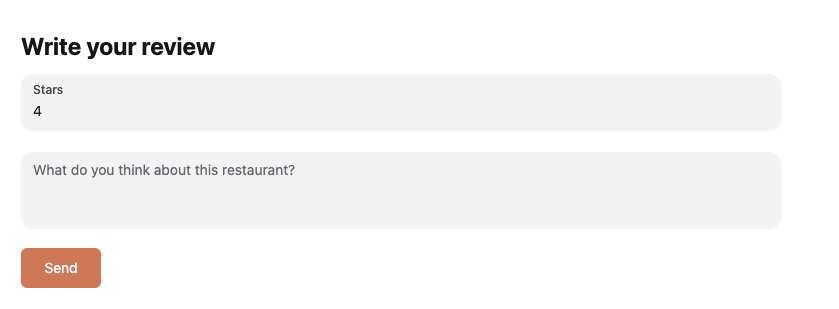
Let's add a small front-end component to restaurant pages. This component will allow a user to write a review directly from the front-end website.
A possible example of a form allowing users to submit a new review on a restaurant's page of the front-end website of FoodAdvisor
**🎯 Goals**:
* Add a form to write a review.
* Display the form on any restaurants page.
* Send a POST request to Strapi's REST API when the form is submitted.
* Use the [previously stored JWT](/cms/backend-customization/examples/authentication) to authenticate the request.
**Related concept**
Additional information on endpoints for content types can be found in the [REST API](/cms/api/rest#endpoints) documentation.
**🧑💻 Code example:**
In the `/client` folder of the [FoodAdvisor](https://github.com/strapi/foodadvisor) project, you could use the following code examples to:
- create a new `pages/restaurant/RestaurantContent/Reviews/new-review.js` file,
- and update the existing `components/pages/restaurant/RestaurantContent/Reviews/reviews.js`.
Example front-end code to add a component for writing reviews and display it on restaurants pages:
1. Create a new file in the `/client` folder to add a new component for writing reviews with the following code:
```jsx title='/client/components/pages/restaurant/RestaurantContent/Reviews/new-review.js'
import { Button, Input, Textarea } from '@nextui-org/react';
import { useFormik } from 'formik';
import { useRouter } from 'next/router';
import React from 'react';
import { getStrapiURL } from '../../../../../utils';
const NewReview = () => {
const router = useRouter();
const { handleSubmit, handleChange, values } = useFormik({
initialValues: {
note: '',
content: '',
},
onSubmit: async (values) => {
/**
* Queries Strapi REST API to reach the reviews endpoint
* using the JWT previously stored in localStorage to authenticate
*/
const res = await fetch(getStrapiURL('/reviews'), {
method: 'POST',
body: JSON.stringify({
restaurant: router.query.slug,
...values,
}),
headers: {
Authorization: `Bearer ${localStorage.getItem('token')}`,
'Content-Type': 'application/json',
},
});
},
});
/**
* Renders the form
*/
return (
Write your review
);
};
export default NewReview;
```
2. Display the new form component on any restaurants page by adding the highlighted lines (7, 8, and 13) to the code used to render restaurant's information:
```jsx title='/client/components/pages/restaurant/RestaurantContent/Reviews/reviews.js' showLineNumbers
import React from 'react';
import delve from 'dlv';
import { formatDistance } from 'date-fns';
import { getStrapiMedia } from '../../../../../utils';
// highlight-start
import { Textarea } from '@nextui-org/react';
import NewReview from './new-review';
// highlight-end
const Reviews = ({ reviews }) => {
return (
// highlight-next-line
{reviews &&
reviews.map((review, index) => (
// …
```
### Controllers vs. Services
Controllers could contain any business logic to be executed when the client requests a route. However, as your code grows bigger and becomes more structured, it is a best practice to split the logic into specific services that do only one thing well, then call the services from controllers.
To illustrate the use of services, in this documentation the custom controller does not handle any responsibilities and delegates all the business logic to services.
Let's say we would like to customize the back end of [FoodAdvisor](https://github.com/strapi/foodadvisor) to achieve the following scenario: when submitting the [previously added review form](#rest-api-queries-from-the-front-end) on the front-end website, Strapi will create a review in the back end and notify the restaurant owner by email. Translating this to Strapi back end customization means performing 3 actions:
1. Creating a custom service to [create the review](#custom-service-creating-a-review).
2. Creating a custom service to [send an email](#custom-service-sending-an-email-to-the-restaurant-owner).
3. [Customizing the default controller](#custom-controller) provided by Strapi for the Review content-type to use the 2 new services.
### Custom service: Creating a review
**💭 Context:**
By default, service files in Strapi includes basic boilerplate code that use the `createCoreService` factory function.
Let's update the existing `review.js` service file for the "Reviews" collection type of [FoodAdvisor](https://github.com/strapi/foodadvisor) by replacing its code to create a review.
**🎯 Goals**:
- Declare a `create` method.
- Grab context from the request.
- Use the `findMany()` method from the Document Service API to find a restaurant.
- Use the `create()` method from the Document Service API to append data to the restaurant, populating the restaurant owner.
- Return the new review data.
**Related concepts**
Additional information can be found in the [request context](/cms/backend-customization/requests-responses), [services](/cms/backend-customization/services) and [Document Service API](/cms/api/document-service) documentation.
**🧑💻 Code example:**
To create such a service, in the `/api` folder of the [FoodAdvisor](https://github.com/strapi/foodadvisor) project, replace the content of the `src/api/review/services/review.js` file with the following code:
```jsx title="src/api/review/services/review.js"
const { createCoreService } = require('@strapi/strapi').factories;
module.exports = createCoreService('api::review.review', ({ strapi }) => ({
async create(ctx) {
const user = ctx.state.user;
const { body } = ctx.request;
/**
* Queries the Restaurants collection type
* using the Document Service API
* to retrieve information about the restaurant.
*/
const restaurants = await strapi.documents('api::restaurant.restaurant').findMany({
filters: {
slug: body.restaurant,
},
});
/**
* Creates a new entry for the Reviews collection type
* and populates data with information about the restaurant's owner
* using the Document Service API.
*/
const newReview = await strapi.documents('api::review.review').create({
data: {
note: body.note,
content: body.content,
restaurant: restaurants[0].documentId,
author: user.id,
},
populate: ['restaurant.owner'],
});
return newReview;
},
}));
```
:::tip Tips
- In a controller's code, the `create` method from this service can be called with `strapi.service('api::review.review').create(ctx)` where `ctx` is the request's [context](/cms/backend-customization/requests-responses).
- The provided example code does not cover error handling. You should consider handling errors, for instance when the restaurant does not exist. Additional information can be found in the [Error handling](/cms/error-handling) documentation.
:::
### Custom Service: Sending an email to the restaurant owner
**💭 Context:**
Out of the box, [FoodAdvisor](https://github.com/strapi/foodadvisor) does not provide any automated email service feature.
Let's create an `email.js` service file to send an email. We could use it in a [custom controller](#custom-controller) to notify the restaurant owner whenever a new review is created on the front-end website.
:::callout 🤗 Optional service
This service is an advanced code example using the [Email](/cms/features/email) plugin and requires understanding how plugins and providers work with Strapi. If you don't need an email service to notify the restaurant's owner, you can skip this part and jump next to the custom [controller](#custom-controller) example.
:::
:::prerequisites
- You have setup a [provider for the Email plugin](/cms/features/email), for instance the [Sendmail](https://www.npmjs.com/package/@strapi/provider-email-sendmail) provider.
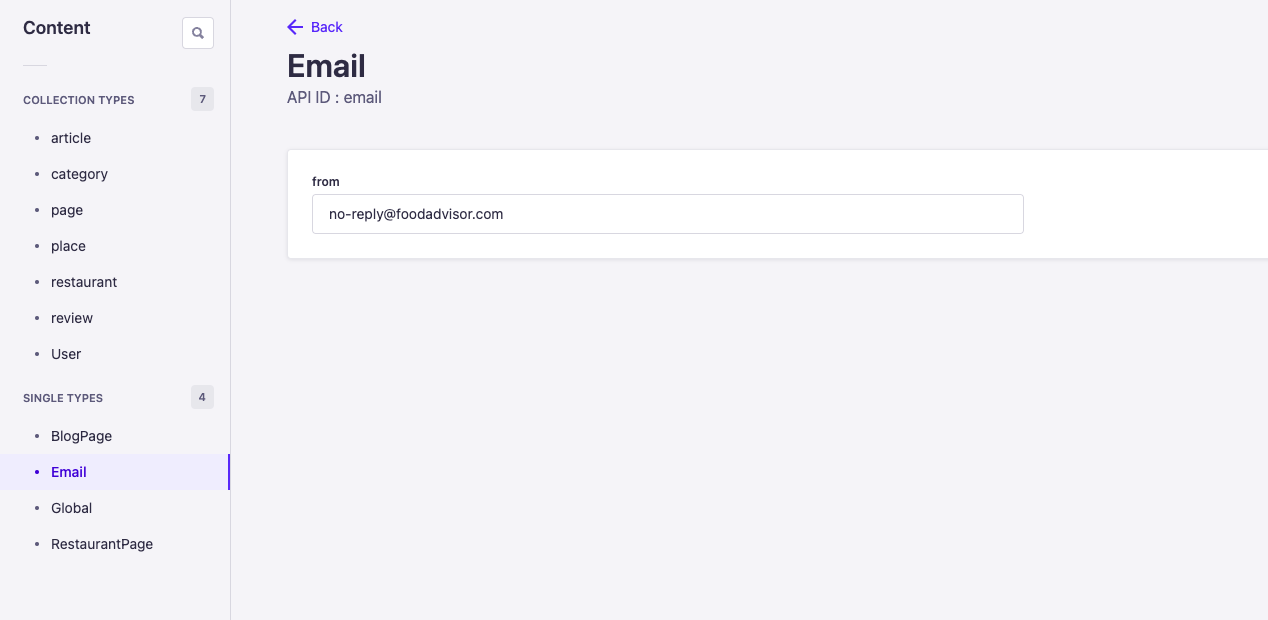
- In Strapi's admin panel, you have [created an `Email` single type](/cms/features/content-type-builder#creating-content-types) that contains a `from` Text field to define the sender email address.
:::
An Email single type has been created in the admin panel. It contains a "from" field used to define the sender address for the Email plugin.
**🎯 Goals**:
- Create a new service file for the "Email" single type,
- Declare a `send()` method for this service,
- Grab the sender address stored in the Email single type using the Document Service API,
- Use email details (recipient's address, subject, and email body) passed when invoking the service's `send()` method to send an email using the Email plugin and a previously configured provider.
**Related concepts**
Additional information can be found in the [Services](/cms/backend-customization/services), [Document Service API](/cms/api/document-service) and [Email feature](/cms/features/email) documentation.
**🧑💻 Code example:**
To create such a service, in the `/api` folder of the [FoodAdvisor](https://github.com/strapi/foodadvisor) project, create a new `src/api/email/services/email.js` file with the following code:
```jsx title="src/api/email/services/email.js"
const { createCoreService } = require('@strapi/strapi').factories;
module.exports = createCoreService('api::email.email', ({ strapi }) => ({
async send({ to, subject, html }) {
/**
* Retrieves email configuration data
* stored in the Email single type
* using the Document Service API.
* For a single type, use findFirst() to get its document.
*/
const emailConfig = await strapi.documents('api::email.email').findFirst();
/**
* Sends an email using:
* - parameters to pass when invoking the service
* - the 'from' address previously retrieved with the email configuration
*/
await strapi.plugins['email'].services.email.send({
to,
subject,
html,
from: emailConfig.from,
});
},
}));
```
:::tip
In a controller's code, the `send` method from this email service can be called with `strapi.service('api::email.email).send(parameters)` where `parameters` is an object with the email's related information (recipient's address, subject, and email body).
:::
### Custom controller
**💭 Context:**
By default, controllers files in Strapi includes basic boilerplate code that use the `createCoreController` factory function. This exposes basic methods to create, retrieve, update, and delete content when reaching the requested endpoint. The default code for the controllers can be customized to perform any business logic.
Let's customize the default controller for the "Reviews" collection type of [FoodAdvisor](https://github.com/strapi/foodadvisor) with the following scenario: upon a `POST` request to the `/reviews` endpoint, the controller calls previously created services to both [create a review](#custom-service-creating-a-review) and [send an email](#custom-service-sending-an-email-to-the-restaurant-owner) to the restaurant's owner.
**🎯 Goals**:
- Extend the existing controller for the "Reviews" collection type.
- Declare a custom `create()` method.
- Call previously created service(s).
- Sanitize the content to be returned.
**Related concept**
Additional information can be found in the [controllers](/cms/backend-customization/controllers) documentation.
**🧑💻 Code example:**
In the `/api` folder of the [FoodAdvisor](https://github.com/strapi/foodadvisor) project, replace the content of the `src/api/review/controllers/review.js` file with one of the following code examples, depending on whether you previously created just [one custom service](#custom-service-creating-a-review) or both custom services for the review creation and the [email notification](#custom-service-sending-an-email-to-the-restaurant-owner):
```jsx title="src/api/review/controllers/review.js"
const { createCoreController } = require('@strapi/strapi').factories;
module.exports = createCoreController('api::review.review', ({ strapi }) => ({
/**
* As the controller action is named
* exactly like the original `create` action provided by the core controller,
* it overwrites it.
*/
async create(ctx) {
// Creates the new review using a service
const newReview = await strapi.service('api::review.review').create(ctx);
const sanitizedReview = await this.sanitizeOutput(newReview, ctx);
ctx.body = sanitizedReview;
},
}));
```
```jsx title="src/api/review/controllers/review.js"
const { createCoreController } = require('@strapi/strapi').factories;
module.exports = createCoreController('api::review.review', ({ strapi }) => ({
/**
* As the controller action is named
* exactly like the original `create` action provided by the core controller,
* it overwrites it.
*/
async create(ctx) {
// Creates the new review using a service
const newReview = await strapi.service('api::review.review').create(ctx);
// Sends an email to the restaurant's owner, using another service
if (newReview.restaurant?.owner) {
await strapi.service('api::email.email').send({
to: newReview.restaurant.owner.email,
subject: 'You have a new review!',
html: `You've received a ${newReview.note} star review: ${newReview.content}`,
});
}
const sanitizedReview = await this.sanitizeOutput(newReview, ctx);
ctx.body = sanitizedReview;
},
}));
```
:::strapi What's next?
Learn more about how [custom policies](/cms/backend-customization/examples/policies) can help you tweak a Strapi-based application and restrict access to some resources based on specific conditions.
:::