# Custom policies
> Source: https://docs.strapi.io/cms/backend-customization/examples/policies
Custom policies control access to content-type endpoints by allowing or blocking requests, and can throw custom errors using `PolicyError` for better error handling and front-end integration.
:::callout 🏗 About these examples
These examples are built around [FoodAdvisor](https://github.com/strapi/foodadvisor), which is no longer Strapi's featured demo application (it has been superseded by [LaunchPad](https://github.com/strapi/LaunchPad)). What matters here is understanding the backend mechanisms being demonstrated, not FoodAdvisor itself. These pages will be revisited to use LaunchPad.
:::
:::prerequisites
This page is part of the back end customization examples cookbook. Please ensure you've read its [introduction](/cms/backend-customization/examples).
:::
Out of the box, [FoodAdvisor](https://github.com/strapi/foodadvisor) does not use any custom policies or route middlewares that could control access to content type endpoints.
In Strapi, controlling access to a content-type endpoint can be done either with a policy or route middleware:
- policies are read-only and allow a request to pass or return an error,
- while route middlewares can perform additional logic.
In our example, let's use a policy.
## Creating a custom policy
**💭 Context:**
Let's say we would like to customize the backend of [FoodAdvisor](https://github.com/strapi/foodadvisor) to prevent restaurant owners from creating fake reviews for their businesses using a [form previously created](/cms/backend-customization/examples/services-and-controllers#rest-api-queries-from-the-front-end) on the front-end website.
**🎯 Goals**:
1. Create a new folder for policies to apply only to the "Reviews" collection type.
2. Create a new policy file.
3. Use the `findMany()` method from the Document Service API to get information about the owner of a restaurant when the `/reviews` endpoint is reached.
4. Return an error if the authenticated user is the restaurant's owner, or let the request pass in other cases.
**Related concepts**
Additional information can be found in the [Policies](/cms/backend-customization/policies), [Routes](/cms/backend-customization/routes), and [Document Service API](/cms/api/document-service) documentation.
**🧑💻 Code example:**
In the `/api` folder of the [FoodAdvisor](https://github.com/strapi/foodadvisor) project, create a new `src/api/review/policies/is-owner-review.js` file with the following code:
```jsx title="src/api/review/policies/is-owner-review.js"
module.exports = async (policyContext, config, { strapi }) => {
const { body } = policyContext.request;
const { user } = policyContext.state;
// Return an error if there is no authenticated user with the request
if (!user) {
return false;
}
/**
* Queries the Restaurants collection type
* using the Document Service API
* to retrieve information about the restaurant's owner.
*/
const [restaurant] = await strapi.documents('api::restaurant.restaurant').findMany({
filters: {
slug: body.restaurant,
},
populate: ['owner'],
});
if (!restaurant) {
return false;
}
/**
* If the user submitting the request is the restaurant's owner,
* we don't allow the review creation.
*/
if (user.id === restaurant.owner.id) {
return false;
}
return true;
};
```
:::caution
Policies or route middlewares should be declared in the configuration of a route to actually control access. Read more about routes in the [reference documentation](/cms/backend-customization/routes) or see an example in the [routes cookbook](/cms/backend-customization/examples/routes).
:::
## Sending custom errors through policies
**💭 Context:**
Out of the box, [FoodAdvisor](https://github.com/strapi/foodadvisor) sends a default error when a policy refuses access to a route. Let's say we want to customize the error sent when the [previously created custom policy](#creating-a-custom-policy) does not allow creating a review.
**🎯 Goal:**
Configure the custom policy to throw a custom error instead of the default error.
**Related concept**
Additional information can be found in the [Error handling](/cms/error-handling) documentation.
**🧑💻 Code example:**
In the `/api` folder of the [FoodAdvisor](https://github.com/strapi/foodadvisor) project, update the [previously created `is-owner-review` custom policy](#creating-a-custom-policy) as follows (highlighted lines are the only modified lines):
```jsx title="src/api/review/policies/is-owner-review.js" showLineNumbers
const { errors } = require('@strapi/utils');
const { PolicyError } = errors;
module.exports = async (policyContext, config, { strapi }) => {
const { body } = policyContext.request;
const { user } = policyContext.state;
// Return an error if there is no authenticated user with the request
if (!user) {
return false;
}
/**
* Queries the Restaurants collection type
* using the Document Service API
* to retrieve information about the restaurant's owner.
*/
const filteredRestaurants = await strapi.documents('api::restaurant.restaurant').findMany({
filters: {
slug: body.restaurant,
},
populate: ['owner'],
});
const restaurant = filteredRestaurants[0];
if (!restaurant) {
return false;
}
/**
* If the user submitting the request is the restaurant's owner,
* we don't allow the review creation.
*/
if (user.id === restaurant.owner.id) {
// highlight-start
/**
* Throws a custom policy error
* instead of just returning false
* (which would result into a generic Policy Error).
*/
throw new PolicyError('The owner of the restaurant cannot submit reviews', {
errCode: 'RESTAURANT_OWNER_REVIEW', // can be useful for identifying different errors on the front end
});
// highlight-end
}
return true;
};
```
Responses sent with default policy error vs. custom policy error:
When a policy refuses access to a route and a default error is thrown, the following response will be sent when trying to query the content-type through the REST API:
```jsx
{
"data": null,
"error": {
"status": 403,
"name": "PolicyError",
"message": "Policy Failed",
"details": {}
}
}
```
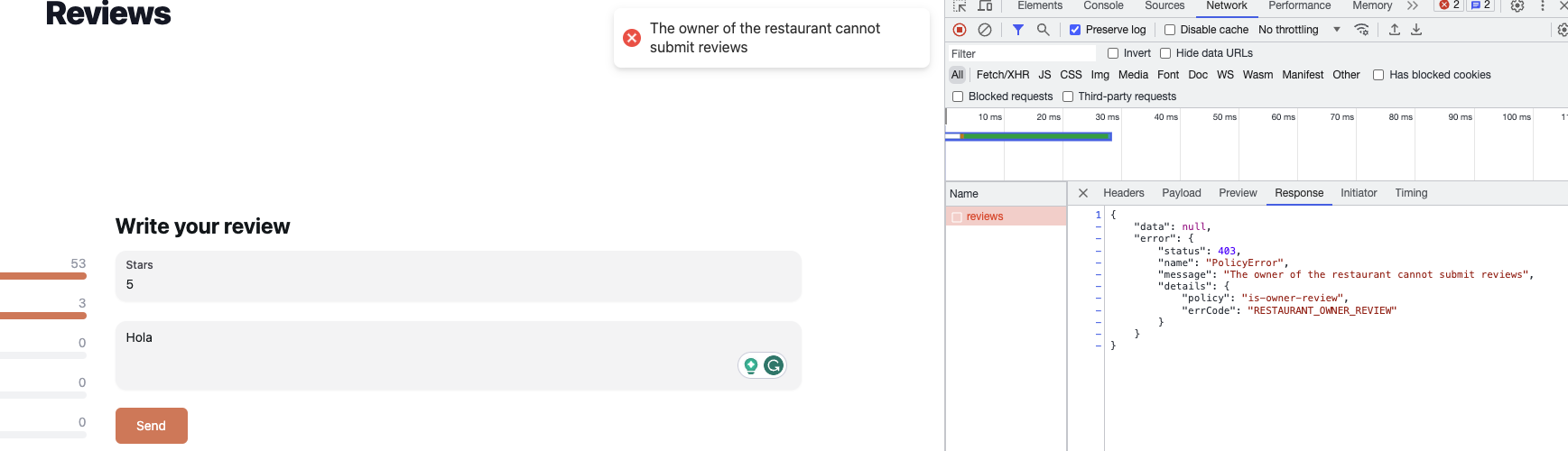
When a policy refuses access to a route and the custom policy throws the custom error defined in the code example above, the following response will be sent when trying to query the content-type through the REST API:
```jsx
{
"data": null,
"error": {
"status": 403,
"name": "PolicyError",
"message": "The owner of the restaurant cannot submit reviews",
"details": {
"policy": "is-owner-review",
"errCode": "RESTAURANT_OWNER_REVIEW"
}
}
}
```
### Using custom errors on the front end
**💭 Context:**
Out of the box, the Next.js-powered front-end website provided with [FoodAdvisor](https://github.com/strapi/foodadvisor) does not display errors or success messages on the front-end website when accessing content. For instance, the website will not inform the user when adding a new review with a [previously created form](/cms/backend-customization/examples/services-and-controllers#rest-api-queries-from-the-front-end) is not possible.
Let's say we want to customize the front end of FoodAdvisor to catch the custom error thrown by a [previously created custom policy](#creating-a-custom-policy) and display it to the user with a [React Hot Toast notification](https://github.com/timolins/react-hot-toast). As a bonus, another toast notification will be displayed when a review is successfully created.
When the restaurant's owner tries to submit a new review, a custom error is returned with the REST API response and a toast notification is displayed on the front-end website.
**🎯 Goals**:
- Catch the error on the front-end website and display it within a notification.
- Send another notification in case the policy allows the creation of a new review.
**🧑💻 Code example:**
In the `/client` folder of the [FoodAdvisor](https://github.com/strapi/foodadvisor) project, you could update the [previously created `new-review` component](/cms/backend-customization/examples/services-and-controllers#rest-api-queries-from-the-front-end) as follows (modified lines are highlighted):
Example front-end code to display toast notifications for custom errors or successful review creation:
```jsx title="/client/components/pages/restaurant/RestaurantContent/Reviews/new-review.js" showLineNumbers
// highlight-start
/**
* A notification will be displayed on the front-end using React Hot Toast
* (See https://github.com/timolins/react-hot-toast).
* React Hot Toast should be added to your project's dependencies;
* Use yarn or npm to install it and it will be added to your package.json file.
*/
class UnauthorizedError extends Error {
constructor(message) {
super(message);
}
}
// highlight-end
const NewReview = () => {
const router = useRouter();
const { handleSubmit, handleChange, values } = useFormik({
initialValues: {
note: '',
content: '',
},
onSubmit: async (values) => {
// highlight-start
/**
* The previously added code is wrapped in a try/catch block.
*/
try {
// highlight-end
const res = await fetch(getStrapiURL('/reviews'), {
method: 'POST',
body: JSON.stringify({
restaurant: router.query.slug,
...values,
}),
headers: {
Authorization: `Bearer ${localStorage.getItem('token')}`,
'Content-Type': 'application/json',
},
});
// highlight-start
const { data, error } = await res.json();
/**
* If the Strapi backend server returns an error,
* we use the custom error message to throw a custom error.
* If the request is a success, we display a success message.
* In both cases, a toast notification is displayed on the front-end.
*/
if (error) {
throw new UnauthorizedError(error.message);
}
toast.success('Review created!');
return data;
} catch (err) {
toast.error(err.message);
console.error(err);
}
},
// highlight-end
});
return (
Write your review
);
};
```
:::strapi What's next?
Learn more about how to configure [custom routes](/cms/backend-customization/examples/routes) to use your custom policies, and how these custom routes can be used to tweak a Strapi-based application.
:::