# Controllers
> Source: https://docs.strapi.io/cms/backend-customization/controllers
Controllers bundle actions that handle business logic for each route within Strapi's MVC pattern. This documentation demonstrates generating controllers, extending core ones with `createCoreController`, and delegating heavy logic to services.
Controllers are JavaScript files that contain a set of methods, called actions, reached by the client according to the requested [route](/cms/backend-customization/routes). Whenever a client requests the route, the action performs the business logic code and sends back the [response](/cms/backend-customization/requests-responses). Controllers represent the C in the model-view-controller (MVC) pattern.
In most cases, the controllers will contain the bulk of a project's business logic. But as a controller's logic becomes more and more complicated, it's a good practice to use [services](/cms/backend-customization/services) to organize the code into re-usable parts.
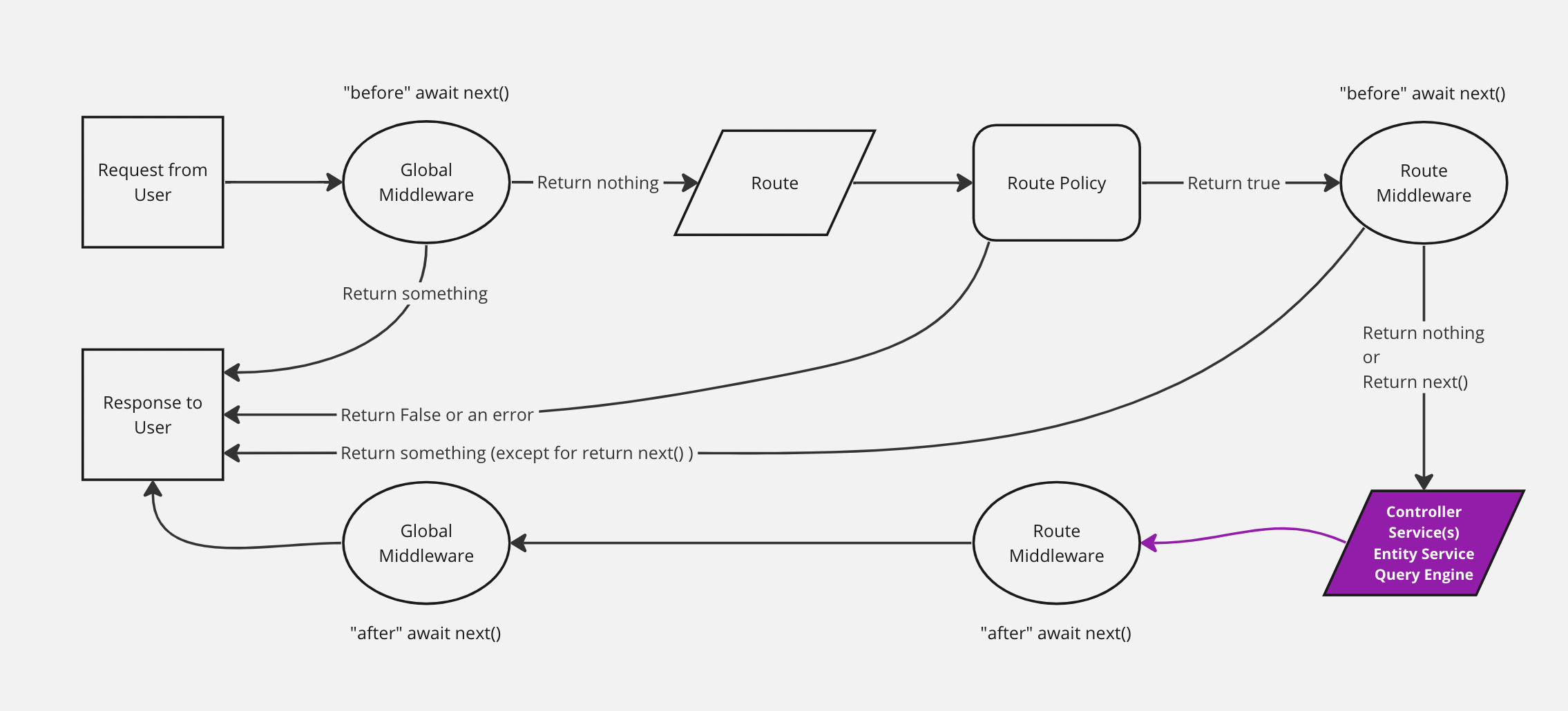
The diagram represents a simplified version of how a request travels through the Strapi back end, with controllers highlighted. The backend customization introduction page includes a complete, interactive diagram.
:::caution Sanitize inputs and outputs
When overriding core actions, always validate and sanitize queries and responses to avoid leaking private fields or bypassing access rules. Use `validateQuery` (optional), `sanitizeQuery` (recommended), and `sanitizeOutput` before returning data from custom actions. See the example below for a safe `find` override.
:::
## Implementation
Controllers can be [generated or added manually](#adding-a-new-controller). Strapi provides a `createCoreController` factory function that automatically generates core controllers and allows building custom ones or [extend or replace the generated controllers](#extending-core-controllers).
### Adding a new controller
A new controller can be implemented:
- with the [interactive CLI command `strapi generate`](/cms/cli)
- or manually by creating a JavaScript file:
- in `./src/api/[api-name]/controllers/` for API controllers (this location matters as controllers are auto-loaded by Strapi from there)
- or in a folder like `./src/plugins/[plugin-name]/server/controllers/` for plugin controllers, though they can be created elsewhere as long as the plugin interface is properly exported in the `strapi-server.js` file (see [Server API for Plugins documentation](/cms/plugins-development/server-api))
```js title="./src/api/restaurant/controllers/restaurant.js"
const { createCoreController } = require('@strapi/strapi').factories;
module.exports = createCoreController('api::restaurant.restaurant', ({ strapi }) => ({
// Method 1: Creating an entirely custom action
async exampleAction(ctx) {
try {
ctx.body = 'ok';
} catch (err) {
ctx.body = err;
}
},
// Method 2: Wrapping a core action (leaves core logic in place)
async find(ctx) {
// some custom logic here
ctx.query = { ...ctx.query, local: 'en' }
// Calling the default core action
const { data, meta } = await super.find(ctx);
// some more custom logic
meta.date = Date.now()
return { data, meta };
},
// Method 3: Replacing a core action with proper sanitization
async find(ctx) {
// validateQuery (optional)
// to throw an error on query params that are invalid or the user does not have access to
await this.validateQuery(ctx);
// sanitizeQuery to remove any query params that are invalid or the user does not have access to
// It is strongly recommended to use sanitizeQuery even if validateQuery is used
const sanitizedQueryParams = await this.sanitizeQuery(ctx);
const { results, pagination } = await strapi.service('api::restaurant.restaurant').find(sanitizedQueryParams);
const sanitizedResults = await this.sanitizeOutput(results, ctx);
return this.transformResponse(sanitizedResults, { pagination });
}
}));
```
```ts title="./src/api/restaurant/controllers/restaurant.ts"
// Method 1: Creating an entirely custom action
async exampleAction(ctx) {
try {
ctx.body = 'ok';
} catch (err) {
ctx.body = err;
}
},
// Method 2: Wrapping a core action (leaves core logic in place)
async find(ctx) {
// some custom logic here
ctx.query = { ...ctx.query, local: 'en' }
// Calling the default core action
const { data, meta } = await super.find(ctx);
// some more custom logic
meta.date = Date.now()
return { data, meta };
},
// Method 3: Replacing a core action with proper sanitization
async find(ctx) {
// validateQuery (optional)
// to throw an error on query params that are invalid or the user does not have access to
await this.validateQuery(ctx);
// sanitizeQuery to remove any query params that are invalid or the user does not have access to
// It is strongly recommended to use sanitizeQuery even if validateQuery is used
const sanitizedQueryParams = await this.sanitizeQuery(ctx);
const { results, pagination } = await strapi.service('api::restaurant.restaurant').find(sanitizedQueryParams);
// sanitizeOutput to ensure the user does not receive any data they do not have access to
const sanitizedResults = await this.sanitizeOutput(results, ctx);
return this.transformResponse(sanitizedResults, { pagination });
}
}));
```
Each controller action can be an `async` or `sync` function.
Every action receives a context object (`ctx`) as a parameter. `ctx` contains the [request context](/cms/backend-customization/requests-responses#ctxrequest) and the [response context](/cms/backend-customization/requests-responses#ctxresponse).
Example: GET /hello route calling a basic controller
A specific `GET /hello` [route](/cms/backend-customization/routes) is defined, the name of the router file (i.e. `index`) is used to call the controller handler (i.e. `index`). Every time a `GET /hello` request is sent to the server, Strapi calls the `index` action in the `hello.js` controller, which returns `Hello World!`:
```js "title="./src/api/hello/routes/hello.js"
module.exports = {
routes: [
{
method: 'GET',
path: '/hello',
handler: 'api::hello.hello.index',
}
]
}
```
```js title="./src/api/hello/controllers/hello.js"
module.exports = {
async index(ctx, next) { // called by GET /hello
ctx.body = 'Hello World!'; // we could also send a JSON
},
};
```
```js title="./src/api/hello/routes/hello.ts"
routes: [
{
method: 'GET',
path: '/hello',
handler: 'api::hello.hello.index',
}
]
}
```
```js title="./src/api/hello/controllers/hello.ts"
async index(ctx, next) { // called by GET /hello
ctx.body = 'Hello World!'; // we could also send a JSON
},
};
```
:::note
When a new [content-type](/cms/backend-customization/models#content-types) is created, Strapi builds a generic controller with placeholder code, ready to be customized.
:::
:::tip
To see a possible advanced usage for custom controllers, read the [services and controllers](/cms/backend-customization/examples/services-and-controllers) page of the backend customization examples cookbook.
:::
### Controllers & Routes: How routes reach controller actions
- Core mapping is automatic: when you generate a content-type, Strapi creates the matching controller and a router file that already targets the standard actions (`find`, `findOne`, `create`, `update`, and `delete`). Overriding any of these actions inside the generated controller does not require touching the router - the route keeps the same handler string and executes your updated logic.
- Adding a route should only be done for new actions or paths. If you introduce a brand-new method such as `exampleAction`, create or update a route entry whose `handler` points to the action so HTTP requests can reach it. Use the fully-qualified handler syntax `::..` (e.g. `api::restaurant.restaurant.exampleAction` for an API controller or `plugin::menus.menu.exampleAction` for a plugin controller).
- Regarding controller and route filenames: the default controller name comes from the filename inside `./src/api/[api-name]/controllers/`. Core routers created with `createCoreRouter` adopt the same name, so the generated handler string matches automatically. Custom routers can follow any file naming scheme, as long as the `handler` string references an exported controller action.
:::note About core mapping
The REST routes Strapi generates for a content-type point each HTTP method at a handler string (for example `api::restaurant.restaurant.find`). That string already identifies the controller file and the exported action name (`find`, `findOne`, `create`, `update`, or `delete`). When you change the implementation inside those exports but keep the names, the router still calls your code. Edit the route file only when you add a new action name or path outside that default CRUD set.
:::
The example below adds a new controller action and exposes it through a custom route without duplicating the existing CRUD route definitions:
```js title="./src/api/restaurant/controllers/restaurant.js"
const { createCoreController } = require('@strapi/strapi').factories;
module.exports = createCoreController('api::restaurant.restaurant', ({ strapi }) => ({
async exampleAction(ctx) {
const specials = await strapi.service('api::restaurant.restaurant').find({ filters: { isSpecial: true } });
return this.transformResponse(specials.results);
},
}));
```
```js title="./src/api/restaurant/routes/01-custom-restaurant.js"
module.exports = {
routes: [
{
method: 'GET',
path: '/restaurants/specials',
handler: 'api::restaurant.restaurant.exampleAction',
},
],
};
```
### Sanitization and Validation in controllers {#sanitization-and-validation-in-controllers}
:::warning
It's strongly recommended you sanitize (v4.8.0+) and/or validate (v4.13.0+) your incoming request query utilizing the new `sanitizeQuery` and `validateQuery` functions to prevent the leaking of private data.
:::
Sanitization means that the object is “cleaned” and returned.
Validation means an assertion is made that the data is already clean and throws an error if something is found that shouldn't be there.
In Strapi 5, both query parameters and input data (i.e., create and update body data) are validated. Any create and update data requests with the following invalid input will throw a `400 Bad Request` error:
- relations the user do not have permission to create
- unrecognized values that are not present on a schema
- non-writable fields and internal timestamps like `createdAt` and `createdBy` fields
- setting or updating an `id` field (except for connecting relations)
:::note Internal `entity-validator` service
Strapi exposes a low-level `entity-validator` service (accessible through `strapi.service('entity-validator')`) with `validateEntityCreation` and `validateEntityUpdate` methods that the document service uses internally. These are not part of the public API and their semantics can change between releases. From a custom controller, service, or middleware, use the documented `validateInput` factory helper or the [`strapi.contentAPI.validate.*` helpers](#sanitize-validate-custom-controllers) instead. They apply the same content-type schema rules and additionally account for permissions, non-writable fields, and the request authentication strategy.
:::
#### Sanitization when utilizing controller factories
Within the Strapi factories the following functions are exposed that can be used for sanitization and validation:
| Function Name | Parameters | Description |
|------------------|----------------------------|--------------------------------------------------------------------------------------|
| `sanitizeQuery` | `ctx` | Sanitizes the request query |
| `sanitizeOutput` | `entity`/`entities`, `ctx` | Sanitizes the output data where entity/entities should be an object or array of data |
| `sanitizeInput` | `data`, `ctx` | Sanitizes the input data |
| `validateQuery` | `ctx` | Validates the request query (throws an error on invalid params) |
| `validateInput` | `data`, `ctx` | (EXPERIMENTAL) Validates the input data (throws an error on invalid data) |
These functions automatically inherit the sanitization settings from the model and sanitize the data accordingly based on the content-type schema and any of the content API authentication strategies, such as the Users & Permissions plugin or API tokens.
:::warning
Because these methods use the model associated with the current controller, if you query data that is from another model (i.e., doing a find for "menus" within a "restaurant" controller method), you must instead use the `strapi.contentAPI` methods, such as `strapi.contentAPI.sanitize.query` described in [Sanitizing Custom Controllers](#sanitize-validate-custom-controllers), or else the result of your query will be sanitized against the wrong model.
:::
```js title="./src/api/restaurant/controllers/restaurant.js"
const { createCoreController } = require('@strapi/strapi').factories;
module.exports = createCoreController('api::restaurant.restaurant', ({ strapi }) => ({
async find(ctx) {
await this.validateQuery(ctx);
const sanitizedQueryParams = await this.sanitizeQuery(ctx);
const { results, pagination } = await strapi.service('api::restaurant.restaurant').find(sanitizedQueryParams);
const sanitizedResults = await this.sanitizeOutput(results, ctx);
return this.transformResponse(sanitizedResults, { pagination });
}
}));
```
```js title="./src/api/restaurant/controllers/restaurant.ts"
async find(ctx) {
const sanitizedQueryParams = await this.sanitizeQuery(ctx);
const { results, pagination } = await strapi.service('api::restaurant.restaurant').find(sanitizedQueryParams);
const sanitizedResults = await this.sanitizeOutput(results, ctx);
return this.transformResponse(sanitizedResults, { pagination });
}
}));
```
#### Sanitization and validation when building custom controllers {#sanitize-validate-custom-controllers}
Within custom controllers, Strapi exposes the following functions via `strapi.contentAPI` for sanitization and validation. To add custom query or body parameters to Content API routes (e.g. in `register`), see [Custom Content API parameters](/cms/backend-customization/routes#custom-content-api-parameters).
| Function Name | Parameters | Description |
|------------------------------|--------------------|---------------------------------------------------------|
| `strapi.contentAPI.sanitize.input` | `data`, `schema`, `auth` | Sanitizes the request input including non-writable fields, removing restricted relations, and other nested "visitors" added by plugins |
| `strapi.contentAPI.sanitize.output` | `data`, `schema`, `auth` | Sanitizes the response output including restricted relations, private fields, passwords, and other nested "visitors" added by plugins |
| `strapi.contentAPI.sanitize.query` | `ctx.query`, `schema`, `auth` | Sanitizes the request query including filters, sort, fields, and populate |
| `strapi.contentAPI.validate.query` | `ctx.query`, `schema`, `auth` | Validates the request query including filters, sort, fields (currently not populate) |
| `strapi.contentAPI.validate.input` | `data`, `schema`, `auth` | (EXPERIMENTAL) Validates the request input including non-writable fields, removing restricted relations, and other nested "visitors" added by plugins |
:::note
Depending on the complexity of your custom controllers, you may need additional sanitization that Strapi cannot currently account for, especially when combining the data from multiple sources.
:::
```js title="./src/api/restaurant/controllers/restaurant.js"
module.exports = {
async findCustom(ctx) {
const contentType = strapi.contentType('api::test.test');
await strapi.contentAPI.validate.query(ctx.query, contentType, { auth: ctx.state.auth });
const sanitizedQueryParams = await strapi.contentAPI.sanitize.query(ctx.query, contentType, { auth: ctx.state.auth });
const documents = await strapi.documents(contentType.uid).findMany(sanitizedQueryParams);
return await strapi.contentAPI.sanitize.output(documents, contentType, { auth: ctx.state.auth });
}
}
```
```js title="./src/api/restaurant/controllers/restaurant.ts"
async findCustom(ctx) {
const contentType = strapi.contentType('api::test.test');
await strapi.contentAPI.validate.query(ctx.query, contentType, { auth: ctx.state.auth });
const sanitizedQueryParams = await strapi.contentAPI.sanitize.query(ctx.query, contentType, { auth: ctx.state.auth });
const documents = await strapi.documents(contentType.uid).findMany(sanitizedQueryParams);
return await strapi.contentAPI.sanitize.output(documents, contentType, { auth: ctx.state.auth });
}
}
```
### Extending core controllers {#extending-core-controllers}
Default controllers and actions are created for each content-type. These default controllers are used to return responses to API requests (e.g. when `GET /api/articles/3` is accessed, the `findOne` action of the default controller for the "Article" content-type is called). Default controllers can be customized to implement your own logic. The following code examples should help you get started.
:::tip
- An action from a core controller can be replaced entirely by [creating a custom action](#adding-a-new-controller) and naming the action the same as the original action (e.g. `find`, `findOne`, `create`, `update`, or `delete`).
- When extending a core controller, you do not need to re-implement any sanitization as it will already be handled by the core controller you are extending. Where possible it's strongly recommended to extend the core controller instead of creating a custom controller.
:::
Collection type examples
:::tip
The [backend customization examples cookbook](/cms/backend-customization/examples) shows how you can overwrite a default controller action, for instance for the [`create` action](/cms/backend-customization/examples/services-and-controllers#custom-controller).
:::
```js
async find(ctx) {
// some logic here
const { data, meta } = await super.find(ctx);
// some more logic
return { data, meta };
}
```
```js
async findOne(ctx) {
// some logic here
const response = await super.findOne(ctx);
// some more logic
return response;
}
```
```js
async create(ctx) {
// some logic here
const response = await super.create(ctx);
// some more logic
return response;
}
```
```js
async update(ctx) {
// some logic here
const response = await super.update(ctx);
// some more logic
return response;
}
```
```js
async delete(ctx) {
// some logic here
const response = await super.delete(ctx);
// some more logic
return response;
}
```
Single type examples
```js
async find(ctx) {
// some logic here
const response = await super.find(ctx);
// some more logic
return response;
}
```
```js
async update(ctx) {
// some logic here
const response = await super.update(ctx);
// some more logic
return response;
}
```
```js
async delete(ctx) {
// some logic here
const response = await super.delete(ctx);
// some more logic
return response;
}
```
## Usage
Controllers are declared and attached to a route. Controllers are automatically called when the route is called, so controllers usually do not need to be called explicitly. However, [services](/cms/backend-customization/services) can call controllers, and in this case the following syntax should be used:
```js
// access an API controller
strapi.controller('api::api-name.controller-name');
// access a plugin controller
strapi.controller('plugin::plugin-name.controller-name');
```
:::tip
To list all the available controllers, run `yarn strapi controllers:list`.
:::