# Understanding populate
> Source: https://docs.strapi.io/cms/api/rest/guides/understanding-populate
The `populate` parameter in REST API queries includes additional fields, relations, components, and dynamic zones in responses beyond default attributes. Use `populate=*` for all 1-level-deep relations, or explicitly specify fields with nested arrays and fragment syntax for deeper or selective population.
:::note Note: Example responses might differ from your experience
The content of this page might not be fully up-to-date with Strapi 5 yet:
- All the conceptual information and explanations are correct and up-to-date.
- However, in the examples, the response content might be slightly different.
Examples will be fully up-to-date _after_ the Strapi 5.0.0 (stable version) release and as soon as the [FoodAdvisor](https://github.com/strapi/foodadvisor) example application is upgraded to Strapi 5.
However, having slightly different response examples should not prevent you from grasping the essential concepts taught in this page.
:::
When querying content-types with Strapi's [REST API](/cms/api/rest), by default, responses only include top-level fields and do not include any relations, media fields, components, or dynamic zones.
Populating in the context of the Strapi REST API means including additional content with your response by returning more fields than the ones returned by default. You use the [`populate` parameter](/cms/api/rest/populate-select#population) to achieve this.
:::info
Throughout this guide, examples are built with real data queried from the server included with the [FoodAdvisor](https://github.com/strapi/foodadvisor) example application. To test examples by yourself, setup FoodAdvisor, start the server in the `/api/` folder, and ensure that proper `find` permissions are given for the queried content-types before sending your queries.
:::
The present guide will cover detailed explanations for the following use cases:
- populate [all fields and relations, 1 level deep](#populate-all-relations-and-fields-1-level-deep),
- populate [some fields and relations, 1 level deep](#populate-1-level-deep-for-specific-relations),
- populate [some fields and relations, several levels deep](#populate-several-levels-deep-for-specific-relations),
- populate [components](#populate-components),
- populate [dynamic zones](#populate-dynamic-zones).
:::info
Populating several levels deep is often called "deep populate".
:::
:::strapi Advanced use case: Populating creator fields
In addition to the various ways of using the `populate` parameter in your queries, you can also build a custom controller as a workaround to populate creator fields (e.g., `createdBy` and `updatedBy`). This is explained in the dedicated [How to populate creator fields](/cms/api/rest/guides/populate-creator-fields) guide.
:::
## Populate all relations and fields, 1 level deep
You can return all relations, media fields, components and dynamic zones with a single query. For relations, this will only work 1 level deep, to prevent performance issues and long response times.
To populate everything 1 level deep, add the `populate=*` parameter to your query.
The following diagram compares data returned by the [FoodAdvisor](https://github.com/strapi/foodadvisor) example application with and without populating everything 1 level deep:
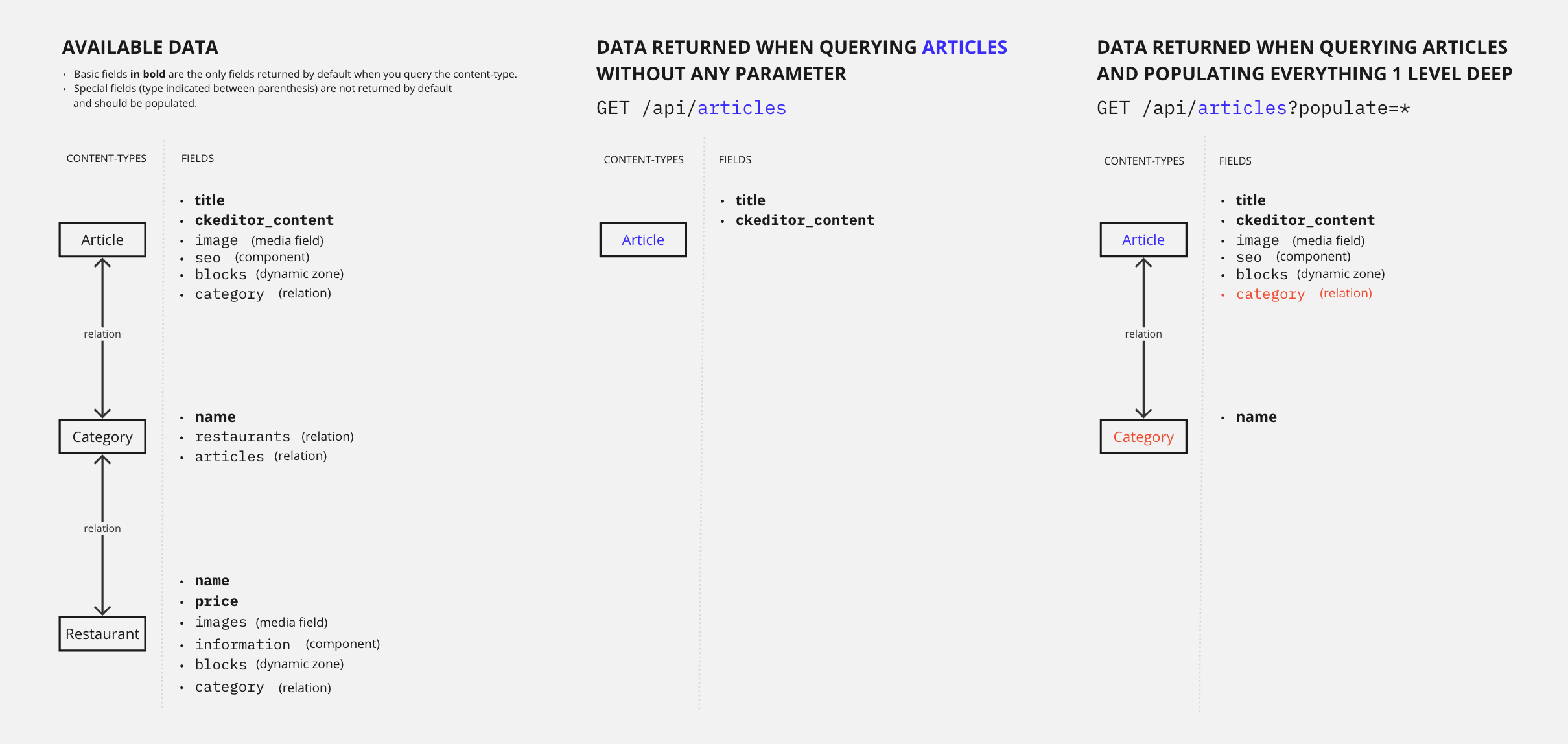
Let's compare and explain what happens with and without this query parameter:
### Example: Without `populate`
Without the populate parameter, a `GET` request to `/api/articles` only returns the default attributes and does not return any media fields, relations, components or dynamic zones.
The following example is the full response for all 4 entries from the `articles` content-types.
Notice how the response only includes the `title`, `slug`, `createdAt`, `updatedAt`, `publishedAt`, and `locale` fields, and the field content of the article as handled by the CKEditor plugin (`ckeditor_content`, truncated for brevity):
#### GET /api/articles — Without populate
Returns only default attributes, without any media fields, relations, components, or dynamic zones.
**Request:**
```
GET /api/articles
```
**Response 200 OK:**
```json
{
"data": [
{
"id": 1,
"documentId": "t3q2i3v1z2j7o8p6d0o4xxg",
"title": "Here's why you have to try basque cuisine, according to a basque chef",
"slug": "here-s-why-you-have-to-try-basque-cuisine-according-to-a-basque-chef",
"createdAt": "2021-11-09T13:33:19.948Z",
"updatedAt": "2023-06-02T10:57:19.584Z",
"publishedAt": "2022-09-22T09:30:00.208Z",
"locale": "en",
"ckeditor_content": "// truncated content"
},
{
"id": 2,
"documentId": "k2r5l0i9g3u2j3b4p7f0sed",
"title": "What are chinese hamburgers and why aren't you eating them?",
"slug": "what-are-chinese-hamburgers-and-why-aren-t-you-eating-them",
"createdAt": "2021-11-11T13:33:19.948Z",
"updatedAt": "2023-06-01T14:32:50.984Z",
"publishedAt": "2022-09-22T12:36:48.312Z",
"locale": "en",
"ckeditor_content": "// truncated content"
},
{
"id": 3,
"documentId": "k6m6l9q0n6v9z2m3i0z5jah",
"title": "7 Places worth visiting for the food alone",
"slug": "7-places-worth-visiting-for-the-food-alone",
"createdAt": "2021-11-12T13:33:19.948Z",
"updatedAt": "2023-06-02T11:30:00.075Z",
"publishedAt": "2023-06-02T11:30:00.075Z",
"locale": "en",
"ckeditor_content": "// truncated content"
},
{
"id": 4,
"documentId": "d5m4b6z6g5d9e3v1k9n5gbn",
"title": "If you don't finish your plate in these countries, you might offend someone",
"slug": "if-you-don-t-finish-your-plate-in-these-countries-you-might-offend-someone",
"createdAt": "2021-11-15T13:33:19.948Z",
"updatedAt": "2023-06-02T10:59:35.148Z",
"publishedAt": "2022-09-22T12:35:53.899Z",
"locale": "en",
"ckeditor_content": "// truncated content"
}
],
"meta": {
"pagination": {
"page": 1,
"pageSize": 25,
"pageCount": 1,
"total": 4
}
}
}
```
### Example: With `populate=*`
With the `populate=*` parameter, a `GET` request to `/api/articles` also returns all media fields, first-level relations, components and dynamic zones.
The following example is the full response for the first of all 4 entries from the `articles` content-types (the data from articles with ids 2, 3, and 4 is truncated for brevity).
Scroll down to see that the response size is much bigger than without populate. The response now includes additional fields (see highlighted lines) such as:
* the `image` media field (which stores all information about the article cover, including all its different formats),
* the first-level fields of the `blocks` dynamic zone and the `seo` component,
* the `category` relation and its fields,
* and even some information about the articles translated in other languages, as shown by the `localizations` object.
:::tip
To populate deeply nested components, see the [populate components](#populate-components) section.
:::
#### GET /api/articles — With populate=*
Returns all media fields, first-level relations, components, and dynamic zones.
**Request:**
```
GET /api/articles?populate=*
```
**Response 200 OK:**
```json
{
"data": [
{
"id": 1,
"title": "Here's why you have to try basque cuisine, according to a basque chef",
"slug": "here-s-why-you-have-to-try-basque-cuisine-according-to-a-basque-chef",
"createdAt": "2021-11-09T13:33:19.948Z",
"updatedAt": "2023-06-02T10:57:19.584Z",
"publishedAt": "2022-09-22T09:30:00.208Z",
"locale": "en",
"ckeditor_content": "// truncated content",
"image": {
"data": {
"id": 12,
"documentId": "o5d4b0l4p8l4o4k5n1l3rxa",
"name": "Basque dish",
"alternativeText": "Basque dish",
"caption": "Basque dish",
"width": 758,
"height": 506,
"formats": {
"thumbnail": {
"name": "thumbnail_https://4d40-2a01-cb00-c8b-1800-7cbb-7da-ea9d-2011.ngrok.io/uploads/basque_cuisine_17fa4567e0.jpeg",
"hash": "thumbnail_basque_cuisine_17fa4567e0_f033424240",
"ext": ".jpeg",
"mime": "image/jpeg",
"width": 234,
"height": 156,
"size": 11.31,
"path": null,
"url": "/uploads/thumbnail_basque_cuisine_17fa4567e0_f033424240.jpeg"
},
"medium": {
"name": "medium_https://4d40-2a01-cb00-c8b-1800-7cbb-7da-ea9d-2011.ngrok.io/uploads/basque_cuisine_17fa4567e0.jpeg",
"hash": "medium_basque_cuisine_17fa4567e0_f033424240",
"ext": ".jpeg",
"mime": "image/jpeg",
"width": 750,
"height": 501,
"size": 82.09,
"path": null,
"url": "/uploads/medium_basque_cuisine_17fa4567e0_f033424240.jpeg"
},
"small": {
"name": "small_https://4d40-2a01-cb00-c8b-1800-7cbb-7da-ea9d-2011.ngrok.io/uploads/basque_cuisine_17fa4567e0.jpeg",
"hash": "small_basque_cuisine_17fa4567e0_f033424240",
"ext": ".jpeg",
"mime": "image/jpeg",
"width": 500,
"height": 334,
"size": 41.03,
"path": null,
"url": "/uploads/small_basque_cuisine_17fa4567e0_f033424240.jpeg"
}
},
"hash": "basque_cuisine_17fa4567e0_f033424240",
"ext": ".jpeg",
"mime": "image/jpeg",
"size": 58.209999999999994,
"url": "/uploads/basque_cuisine_17fa4567e0_f033424240.jpeg",
"previewUrl": null,
"provider": "local",
"provider_metadata": null,
"createdAt": "2021-11-23T14:05:33.460Z",
"updatedAt": "2021-11-23T14:05:46.084Z"
}
}
},
"blocks": [
{
"id": 2,
"__component": "blocks.related-articles"
},
{
"id": 2,
"documentId": "w8r5k8o8v0t9l9e0d7y6vco",
"__component": "blocks.cta-command-line",
"theme": "primary",
"title": "Want to give a try to a Strapi starter?",
"text": "❤️",
"commandLine": "git clone https://github.com/strapi/nextjs-corporate-starter.git"
}
],
"seo": {
"id": 1,
"documentId": "h7c8d0u3i3q5v1j3j3r4cxf",
"metaTitle": "Articles - FoodAdvisor",
"metaDescription": "Discover our articles about food, restaurants, bars and more! - FoodAdvisor",
"keywords": "food",
"metaRobots": null,
"structuredData": null,
"metaViewport": null,
"canonicalURL": null
},
"category": {
"data": {
"id": 4,
"documentId": "t1t3d9k6n1k5a6r8l7f8rox",
"name": "European",
"slug": "european",
"createdAt": "2021-11-09T13:33:20.123Z",
"updatedAt": "2021-11-09T13:33:20.123Z"
}
},
"localizations": {
"data": [
{
"id": 10,
"documentId": "h7c8d0u3i3q5v1j3j3r4cxf",
"title": "Voici pourquoi il faut essayer la cuisine basque, selon un chef basque",
"slug": "voici-pourquoi-il-faut-essayer-la-cuisine-basque-selon-un-chef-basque",
"createdAt": "2021-11-18T13:33:19.948Z",
"updatedAt": "2023-06-02T10:57:19.606Z",
"publishedAt": "2022-09-22T13:00:00.069Z",
"locale": "fr-FR",
"ckeditor_content": "// truncated content"
}
]
}
}
},
{
"id": 2,
"// truncated content": true
},
{
"id": 3,
"// truncated content": true
},
{
"id": 4,
"// truncated content": true
}
],
"meta": {
"pagination": {
"page": 1,
"pageSize": 25,
"pageCount": 1,
"total": 4
}
}
}
```
## Populate specific relations and fields
You can also populate specific relations and fields, by explicitly defining what to populate. This requires that you know the name of fields and relations to populate.
Relations and fields populated this way can be 1 or several levels deep. The following diagram compares data returned by the [FoodAdvisor](https://github.com/strapi/foodadvisor) example application when you populate [1 level deep](#populate-1-level-deep-for-specific-relations) vs. [2 levels deep](#populate-several-levels-deep-for-specific-relations):
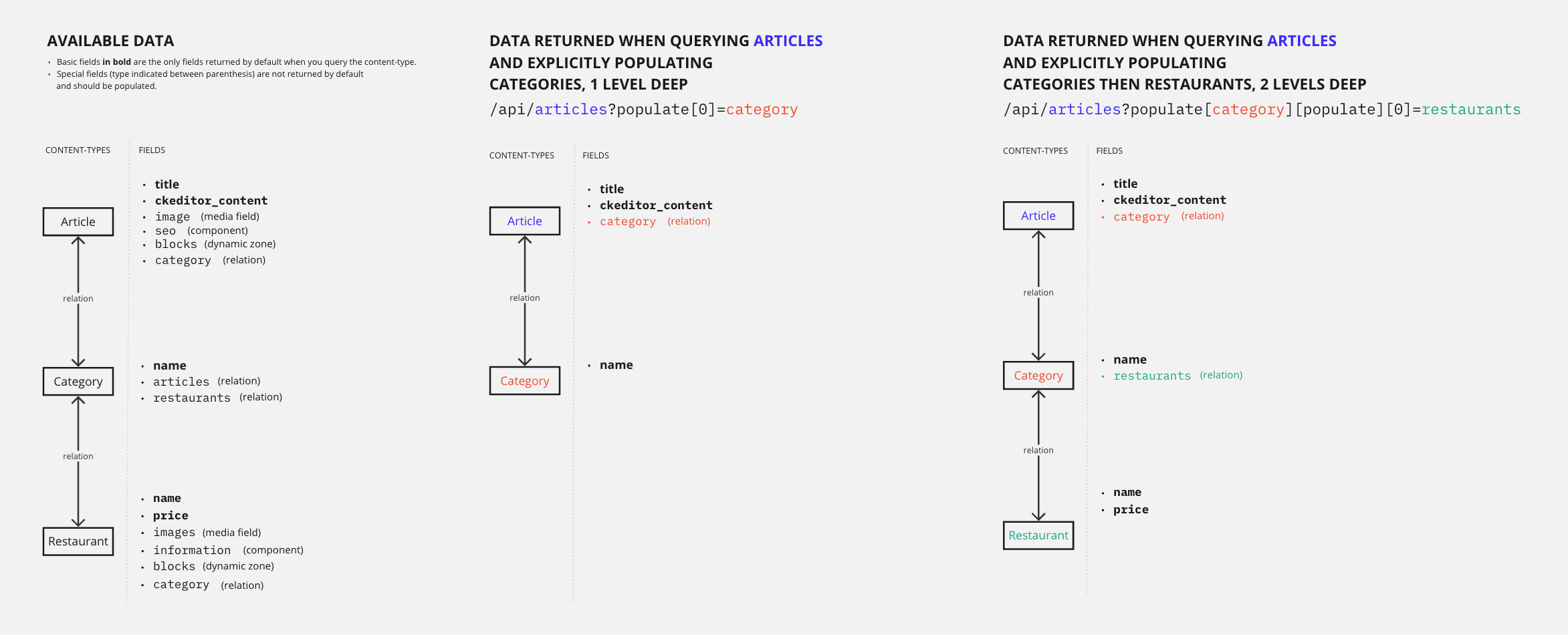
**Different populating strategies for similar results**
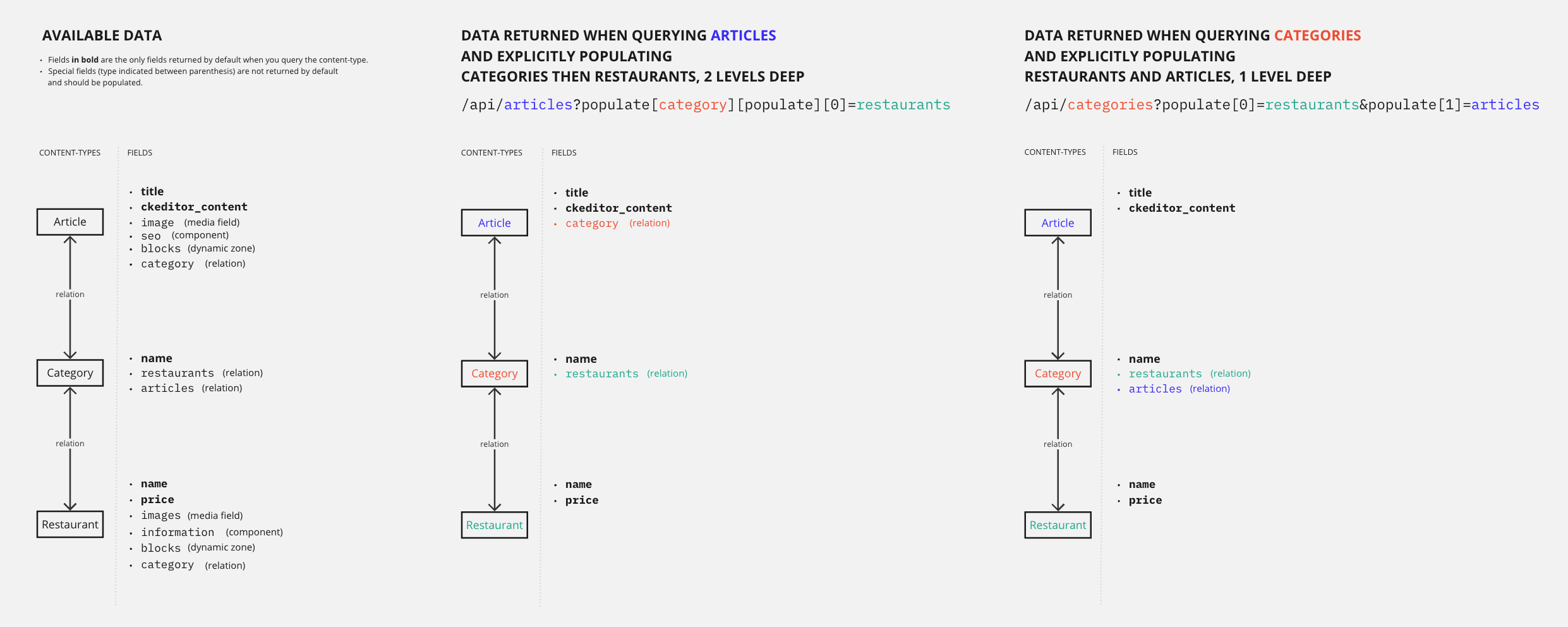
Depending on your content structure, you might get similar data presented in different ways with different queries. For instance, the FoodAdvisor example application includes the article, category, and restaurant content-types that are all in relation to each other in different ways. This means that if you want to get data about the 3 content-types in a single GET request, you have 2 options:
- query articles and populate categories, plus populate the nested relation between categories and restaurants ([2 levels deep population](#populate-several-levels-deep-for-specific-relations))
- query categories and populate both articles and restaurants because categories have a 1st level relation with the 2 other content-types ([1 level deep](#populate-1-level-deep-for-specific-relations))
The 2 different strategies are illustrated in the following diagram:
Populate as an object vs. populate as an array: Using the interactive query builder
The syntax for advanced query parameters can be quite complex to build manually. We recommend you use our [interactive query builder](/cms/api/rest/interactive-query-builder) tool to generate the URL.
Using this tool, you will write clean and readable requests in a familiar (JavaScript) format, which should help you understand the differences between different queries and different ways of populating. For instance, populating 2 levels deep implies using populate as an object, while populating several relations 1 level deep implies using populate as an array:
Populate as an object
(to populate 1 relation several levels deep):
```json
{
populate: {
category: {
populate: ['restaurants'],
},
},
}
```
Populate as an array
(to populate many relations 1 level deep)
```json
{
populate: [
'articles',
'restaurants'
],
}
```
### Populate 1 level deep for specific relations
You can populate specific relations 1 level deep by using the populate parameter as an array.
Since the REST API uses the [LHS bracket notation](https://christiangiacomi.com/posts/rest-design-principles/#lhs-brackets) (i.e., with square brackets `[]`), the parameter syntaxes to populate 1 level deep would look like the following:
| How many relations to populate | Syntax example |
|-------------------------------|--------------------|
| Only 1 relation | `populate[0]=a-relation-name` |
| Several relations | `populate[0]=relation-name&populate[1]=another-relation-name&populate[2]=yet-another-relation-name` |
Let's compare and explain what happens with and without populating relations 1 level deep when sending queries to the [FoodAdvisor](https://github.com/strapi/foodadvisor) example application:
#### Example: Without `populate`
Without the populate parameter, a `GET` request to `/api/articles` only returns the default attributes.
The following example is the full response for all 4 entries from the `articles` content-type.
Notice that the response does not include any media fields, relations, components or dynamic zones:
#### GET /api/articles — Without populate
Returns only default attributes for all articles.
**Request:**
```
GET /api/articles
```
**Response 200 OK:**
```json
{
"data": [
{
"id": 1,
"documentId": "x2m0d7d9o4m2z3u2r2l9yes",
"title": "Here's why you have to try basque cuisine, according to a basque chef",
"slug": "here-s-why-you-have-to-try-basque-cuisine-according-to-a-basque-chef",
"createdAt": "2021-11-09T13:33:19.948Z",
"updatedAt": "2023-06-02T10:57:19.584Z",
"publishedAt": "2022-09-22T09:30:00.208Z",
"locale": "en",
"ckeditor_content": "…"
},
{
"id": 2,
"documentId": "k6m6l9q0n6v9z2m3i0z5jah",
"title": "What are chinese hamburgers and why aren't you eating them?",
"slug": "what-are-chinese-hamburgers-and-why-aren-t-you-eating-them",
"createdAt": "2021-11-11T13:33:19.948Z",
"updatedAt": "2023-06-01T14:32:50.984Z",
"publishedAt": "2022-09-22T12:36:48.312Z",
"locale": "en",
"ckeditor_content": "…"
},
{
"id": 3,
"documentId": "o5d4b0l4p8l4o4k5n1l3rxa",
"title": "7 Places worth visiting for the food alone",
"slug": "7-places-worth-visiting-for-the-food-alone",
"createdAt": "2021-11-12T13:33:19.948Z",
"updatedAt": "2023-06-02T11:30:00.075Z",
"publishedAt": "2023-06-02T11:30:00.075Z",
"locale": "en",
"ckeditor_content": "…"
},
{
"id": 4,
"documentId": "t3q2i3v1z2j7o8p6d0o4xxg",
"title": "If you don't finish your plate in these countries, you might offend someone",
"slug": "if-you-don-t-finish-your-plate-in-these-countries-you-might-offend-someone",
"createdAt": "2021-11-15T13:33:19.948Z",
"updatedAt": "2023-06-02T10:59:35.148Z",
"publishedAt": "2022-09-22T12:35:53.899Z",
"locale": "en",
"ckeditor_content": "…"
}
],
"meta": {
"pagination": {
"page": 1,
"pageSize": 25,
"pageCount": 1,
"total": 4
}
}
}
```
#### Example: With `populate[0]=category`
With `populate[0]=category` added to the request, we explicitly ask to include some information about `category`, which is a relation field that links the `articles` and the `categories` content-types.
The following example is the full response for all 4 entries from the `articles` content-type.
Notice that the response now includes additional data with the `category` field for each article (see highlighted lines):
#### GET /api/articles — With populate[0]=category
Returns articles with their related category data populated.
**Request:**
```
GET /api/articles?populate[0]=category
```
**Response 200 OK:**
```json
{
"data": [
{
"id": 1,
"documentId": "w8r5k8o8v0t9l9e0d7y6vco",
"title": "Here's why you have to try basque cuisine, according to a basque chef",
"slug": "here-s-why-you-have-to-try-basque-cuisine-according-to-a-basque-chef",
"createdAt": "2021-11-09T13:33:19.948Z",
"updatedAt": "2023-06-02T10:57:19.584Z",
"publishedAt": "2022-09-22T09:30:00.208Z",
"locale": "en",
"ckeditor_content": "…",
"category": {
"data": {
"id": 4,
"documentId": "u6x8u7o7j5q1l5y3t8j9yxi",
"name": "European",
"slug": "european",
"createdAt": "2021-11-09T13:33:20.123Z",
"updatedAt": "2021-11-09T13:33:20.123Z"
}
}
},
{
"id": 2,
"documentId": "k6m6l9q0n6v9z2m3i0z5jah",
"title": "What are chinese hamburgers and why aren't you eating them?",
"slug": "what-are-chinese-hamburgers-and-why-aren-t-you-eating-them",
"createdAt": "2021-11-11T13:33:19.948Z",
"updatedAt": "2023-06-01T14:32:50.984Z",
"publishedAt": "2022-09-22T12:36:48.312Z",
"locale": "en",
"ckeditor_content": "…",
"category": {
"data": {
"id": 13,
"documentId": "x2m0d7d9o4m2z3u2r2l9yes",
"name": "Chinese",
"slug": "chinese",
"createdAt": "2021-11-09T13:33:20.123Z",
"updatedAt": "2021-11-09T13:33:20.123Z"
}
}
},
{
"id": 3,
"title": "7 Places worth visiting for the food alone",
"slug": "7-places-worth-visiting-for-the-food-alone",
"createdAt": "2021-11-12T13:33:19.948Z",
"updatedAt": "2023-06-02T11:30:00.075Z",
"publishedAt": "2023-06-02T11:30:00.075Z",
"locale": "en",
"ckeditor_content": "…",
"category": {
"data": {
"id": 3,
"documentId": "h7c8d0u3i3q5v1j3j3r4cxf",
"name": "International",
"slug": "international",
"createdAt": "2021-11-09T13:33:20.123Z",
"updatedAt": "2021-11-09T13:33:20.123Z"
}
}
},
{
"id": 4,
"documentId": "t1t3d9k6n1k5a6r8l7f8rox",
"title": "If you don't finish your plate in these countries, you might offend someone",
"slug": "if-you-don-t-finish-your-plate-in-these-countries-you-might-offend-someone",
"createdAt": "2021-11-15T13:33:19.948Z",
"updatedAt": "2023-06-02T10:59:35.148Z",
"publishedAt": "2022-09-22T12:35:53.899Z",
"locale": "en",
"ckeditor_content": "…",
"category": {
"data": {
"id": 3,
"documentId": "u6x8u7o7j5q1l5y3t8j9yxi",
"name": "International",
"slug": "international",
"createdAt": "2021-11-09T13:33:20.123Z",
"updatedAt": "2021-11-09T13:33:20.123Z"
}
}
}
],
"meta": {
"pagination": {
"page": 1,
"pageSize": 25,
"pageCount": 1,
"total": 4
}
}
}
```
### Populate several levels deep for specific relations
You can also populate specific relations several levels deep. For instance, when you populate a relation which itself populates another relation, you are populating 2 levels deep. Populating 2 levels deep is the example covered in this guide.
:::caution
There is no limit on the number of levels that can be populated. However, the deeper the populates, the more the request will take time to be performed.
:::
Since the REST API uses the [LHS bracket notation](https://christiangiacomi.com/posts/rest-design-principles/#lhs-brackets), (i.e., with square brackets `[]`), for instance if you want to populate a relation nested inside another relation, the parameter syntax would look like the following:
`populate[first-level-relation-to-populate][populate][0]=second-level-relation-to-populate`
:::tip
The syntax for advanced query parameters can be quite complex to build manually. We recommend you use our [interactive query builder](/cms/api/rest/interactive-query-builder) tool to generate the URL. For instance, the `/api/articles?populate[category][populate][0]=restaurants` URL used in the following examples has been generated by converting the following object using our tool:
```json
{
populate: {
category: {
populate: ['restaurants'],
},
},
}
```
:::
The [FoodAdvisor](https://github.com/strapi/foodadvisor) example application includes various levels of relations between content-types. For instance:
- an `article` content-type includes a relation with the `category` content-type,
- but a `category` can also be assigned to any `restaurant` content-type.
With a single `GET` request to `/api/articles` and the appropriate populate parameters, you can return information about articles, restaurants, and categories simultaneously.
Let's compare and explain the responses returned with `populate[0]=category` (1 level deep) and `populate[category][populate][0]=restaurants` (2 levels deep) when sending queries to FoodAdvisor:
#### Example: With 1-level deep population
When we only populate 1 level deep, asking for the categories associated to articles, we can get the following example response (highlighted lines show the `category` relations field):
#### GET /api/articles — With 1-level deep population
Populates the category relation 1 level deep.
**Request:**
```
GET /api/articles?populate[0]=category
```
**Response 200 OK:**
```json
{
"data": [
{
"id": 1,
"documentId": "9ih6hy1bnma3q3066kdwt3",
"title": "Here's why you have to try basque cuisine, according to a basque chef",
"slug": "here-s-why-you-have-to-try-basque-cuisine-according-to-a-basque-chef",
"createdAt": "2021-11-09T13:33:19.948Z",
"updatedAt": "2023-06-02T10:57:19.584Z",
"publishedAt": "2022-09-22T09:30:00.208Z",
"locale": "en",
"ckeditor_content": "…",
"category": {
"data": {
"id": 4,
"name": "European",
"slug": "european",
"createdAt": "2021-11-09T13:33:20.123Z",
"updatedAt": "2021-11-09T13:33:20.123Z"
}
}
},
{
"id": 2,
"documentId": "sen6qfgxcac13pwchf8xbu",
"title": "What are chinese hamburgers and why aren't you eating them?",
"slug": "what-are-chinese-hamburgers-and-why-aren-t-you-eating-them",
"createdAt": "2021-11-11T13:33:19.948Z",
"updatedAt": "2023-06-01T14:32:50.984Z",
"publishedAt": "2022-09-22T12:36:48.312Z",
"locale": "en",
"ckeditor_content": "…",
"category": {
"data": {
"id": 13,
"documentId": "r3rhzcxd7gjx07vkq3pia5",
"name": "Chinese",
"slug": "chinese",
"createdAt": "2021-11-09T13:33:20.123Z",
"updatedAt": "2021-11-09T13:33:20.123Z"
}
}
},
{
"id": 3,
"documentId": "s9uu7rkukhfcsmj2e60b67",
"title": "7 Places worth visiting for the food alone",
"slug": "7-places-worth-visiting-for-the-food-alone",
"createdAt": "2021-11-12T13:33:19.948Z",
"updatedAt": "2023-06-02T11:30:00.075Z",
"publishedAt": "2023-06-02T11:30:00.075Z",
"locale": "en",
"ckeditor_content": "…",
"category": {
"data": {
"id": 3,
"documentId": "4sevz15w6bdol6y4t8kblk",
"name": "International",
"slug": "international",
"createdAt": "2021-11-09T13:33:20.123Z",
"updatedAt": "2021-11-09T13:33:20.123Z"
}
}
},
{
"id": 4,
"documentId": "iy5ifm3xj8q0t8vlq6l23h",
"title": "If you don't finish your plate in these countries, you might offend someone",
"slug": "if-you-don-t-finish-your-plate-in-these-countries-you-might-offend-someone",
"createdAt": "2021-11-15T13:33:19.948Z",
"updatedAt": "2023-06-02T10:59:35.148Z",
"publishedAt": "2022-09-22T12:35:53.899Z",
"locale": "en",
"ckeditor_content": "…",
"category": {
"data": {
"id": 3,
"documentId": "0eor603u8qej933maphdv3",
"name": "International",
"slug": "international",
"createdAt": "2021-11-09T13:33:20.123Z",
"updatedAt": "2021-11-09T13:33:20.123Z"
}
}
}
],
"meta": {
"pagination": {
"page": 1,
"pageSize": 25,
"pageCount": 1,
"total": 4
}
}
}
```
#### Example: With 2-level deep population
When we populate 2 levels deep, asking for the categories associated to articles, but also for restaurants associated to these categories, we can get the following example response.
Notice that we now have the `restaurants` relation field included with the response inside the `category` relation (see highlighted lines):
#### GET /api/articles — With 2-level deep population
Populates the category relation and the nested restaurants relation 2 levels deep.
**Request:**
```
GET /api/articles?populate[category][populate][0]=restaurants
```
**Response 200 OK:**
```json
{
"data": [
{
"id": 1,
"documentId": "iy5ifm3xj8q0t8vlq6l23h",
"title": "Here's why you have to try basque cuisine, according to a basque chef",
"slug": "here-s-why-you-have-to-try-basque-cuisine-according-to-a-basque-chef",
"createdAt": "2021-11-09T13:33:19.948Z",
"updatedAt": "2023-06-02T10:57:19.584Z",
"publishedAt": "2022-09-22T09:30:00.208Z",
"locale": "en",
"ckeditor_content": "…",
"category": {
"data": {
"id": 4,
"name": "European",
"slug": "european",
"createdAt": "2021-11-09T13:33:20.123Z",
"updatedAt": "2021-11-09T13:33:20.123Z",
"restaurants": {
"data": [
{
"id": 1,
"documentId": "ozlqrdxpnjb7wtvf6lp74v",
"name": "Mint Lounge",
"slug": "mint-lounge",
"price": "p3",
"createdAt": "2021-11-09T14:07:47.125Z",
"updatedAt": "2021-11-23T16:41:30.504Z",
"publishedAt": "2021-11-23T16:41:30.501Z",
"locale": "en"
},
{
"id": 9,
"// truncated content": true
},
{
"id": 10,
"// truncated content": true
},
{
"id": 12,
"// truncated content": true
},
{
"id": 21,
"// truncated content": true
},
{
"id": 26,
"// truncated content": true
}
]
}
}
}
},
{
"id": 2,
"// truncated content": true
},
{
"id": 3,
"// truncated content": true
},
{
"id": 4,
"// truncated content": true
}
],
"meta": {
"pagination": {
"page": 1,
"pageSize": 25,
"pageCount": 1,
"total": 4
}
}
}
```
### Populate components
Components and dynamic zones are not included in responses by default and you need to explicitly populate each dynamic zones, components, and their nested components.
Since the REST API uses the [LHS bracket notation](https://christiangiacomi.com/posts/rest-design-principles/#lhs-brackets), (i.e., with square brackets `[]`), you need to pass all elements in a `populate` array. Nested fields can also be passed, and the parameter syntax could look like the following:
`populate[0]=a-first-field&populate[1]=a-second-field&populate[2]=a-third-field&populate[3]=a-third-field.a-nested-field&populate[4]=a-third-field.a-nested-component.a-nested-field-within-the-component`
:::tip
The syntax for advanced query parameters can be quite complex to build manually. We recommend you use our [interactive query builder](/cms/api/rest/interactive-query-builder) tool to generate the URL. For instance, the `/api/articles?populate[0]=seo&populate[1]=seo.metaSocial&populate[2]=seo.metaSocial.image` URL used in the following examples has been generated by converting the following object using our tool:
```json
{
populate: [
'seoData',
'seoData.sharedImage',
'seoData.sharedImage.media',
],
},
```
:::
The [FoodAdvisor](https://github.com/strapi/foodadvisor) example application includes various components and even components nested inside other components. For instance:
- an `article` content-type includes a `seo` component ,
- the `seo` component includes a nested, repeatable `metaSocial` component ,
- and the `metaSocial` component itself has several fields, including an `image` media field .
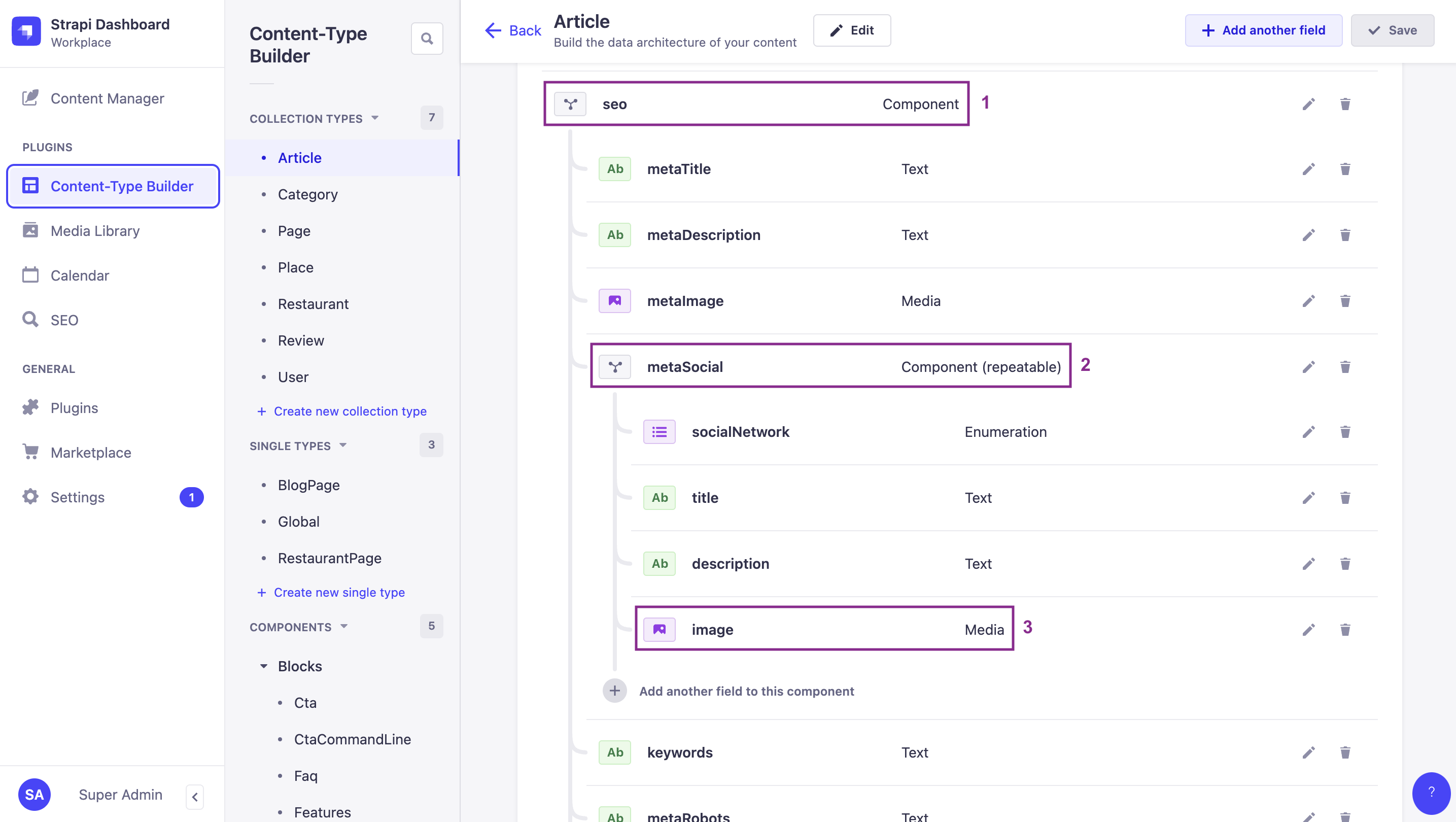
By default, none of these fields or components are included in the response of a `GET` request to `/api/articles`. But with the appropriate populate parameters, you can return all of them in a single request.
Let's compare and explain the responses returned with `populate[0]=seo` (1st level component) and `populate[0]=seo&populate[1]=seo.metaSocial` (2nd level component nested within the 1st level component):
#### Example: Only 1st level component
When we only populate the `seo` component, we go only 1 level deep, and we can get the following example response. Highlighted lines show the `seo` component.
Notice there's no mention of the `metaSocial` component nested within the `seo` component:
#### GET /api/articles — Only 1st level component
Populates only the seo component, 1 level deep.
**Request:**
```
GET /api/articles?populate[0]=seo
```
**Response 200 OK:**
```json
{
"data": [
{
"id": 1,
"documentId": "md60m5cy3dula5g87x1uar",
"title": "Here's why you have to try basque cuisine, according to a basque chef",
"slug": "here-s-why-you-have-to-try-basque-cuisine-according-to-a-basque-chef",
"createdAt": "2021-11-09T13:33:19.948Z",
"updatedAt": "2023-06-02T10:57:19.584Z",
"publishedAt": "2022-09-22T09:30:00.208Z",
"locale": "en",
"ckeditor_content": "…",
"seo": {
"id": 1,
"documentId": "kqcwhq6hes25kt9ebj8x7j",
"metaTitle": "Articles - FoodAdvisor",
"metaDescription": "Discover our articles about food, restaurants, bars and more! - FoodAdvisor",
"keywords": "food",
"metaRobots": null,
"structuredData": null,
"metaViewport": null,
"canonicalURL": null
}
},
{
"id": 2,
"// truncated content": true
},
{
"id": 3,
"// truncated content": true
},
{
"id": 4,
"// truncated content": true
}
],
"meta": {
"pagination": {
"page": 1,
"pageSize": 25,
"pageCount": 1,
"total": 4
}
}
}
```
#### Example: 1st level and 2nd level component
When we populate 2 levels deep, asking both for the `seo` component and the `metaSocial` component nested inside `seo`, we can get the following example response.
Notice that we now have the `metaSocial` component-related data included with the response (see highlighted lines):
#### GET /api/articles — 1st level and 2nd level component
Populates the seo component and the nested metaSocial component.
**Request:**
```
GET /api/articles?populate[0]=seo&populate[1]=seo.metaSocial
```
**Response 200 OK:**
```json
{
"data": [
{
"id": 1,
"documentId": "c2imt19iywk27hl2ftph7s",
"title": "Here's why you have to try basque cuisine, according to a basque chef",
"slug": "here-s-why-you-have-to-try-basque-cuisine-according-to-a-basque-chef",
"createdAt": "2021-11-09T13:33:19.948Z",
"updatedAt": "2023-06-02T10:57:19.584Z",
"publishedAt": "2022-09-22T09:30:00.208Z",
"locale": "en",
"ckeditor_content": "…",
"seo": {
"id": 1,
"documentId": "e8cnux5ejxyqrejd5addfv",
"metaTitle": "Articles - FoodAdvisor",
"metaDescription": "Discover our articles about food, restaurants, bars and more! - FoodAdvisor",
"keywords": "food",
"metaRobots": null,
"structuredData": null,
"metaViewport": null,
"canonicalURL": null,
"metaSocial": [
{
"id": 1,
"documentId": "ks7xsp9fewoi0qljcz9qa0",
"socialNetwork": "Facebook",
"title": "Browse our best articles about food and restaurants ",
"description": "Discover our articles about food, restaurants, bars and more!"
}
]
}
},
{
"id": 2,
"// truncated content": true
},
{
"id": 3,
"// truncated content": true
},
{
"id": 4,
"// truncated content": true
}
],
"meta": {
"pagination": {
"page": 1,
"pageSize": 25,
"pageCount": 1,
"total": 4
}
}
}
```
### Populate dynamic zones
Dynamic zones are highly dynamic content structures by essence. When querying dynamic zones, standard populate parameters (such as `populate[0]=dynamic-zone-name` or `populate=*`) will only fetch the default scalar fields (e.g., strings, numbers, booleans) of the components within the dynamic zone. By default, they will **not** populate nested relations, media fields, or nested components inside those components.
To retrieve component-specific nested relations, media fields, or components within a dynamic zone, you must define per-component populate queries using the `on` property (fragment population syntax). This is because different components in a dynamic zone can have completely different structures, and require their own unique nested queries.
For instance, in the [FoodAdvisor](https://github.com/strapi/foodadvisor) example application:
- A `blocks` dynamic zone exists on the `article` content-type .
- The dynamic zone includes 3 different components: `relatedArticles` , `faq` , and `CtaCommandLine` . All components have a different content structure containing various fields.
- The `relatedArticles` component has an `articles` relation with the article content-type.
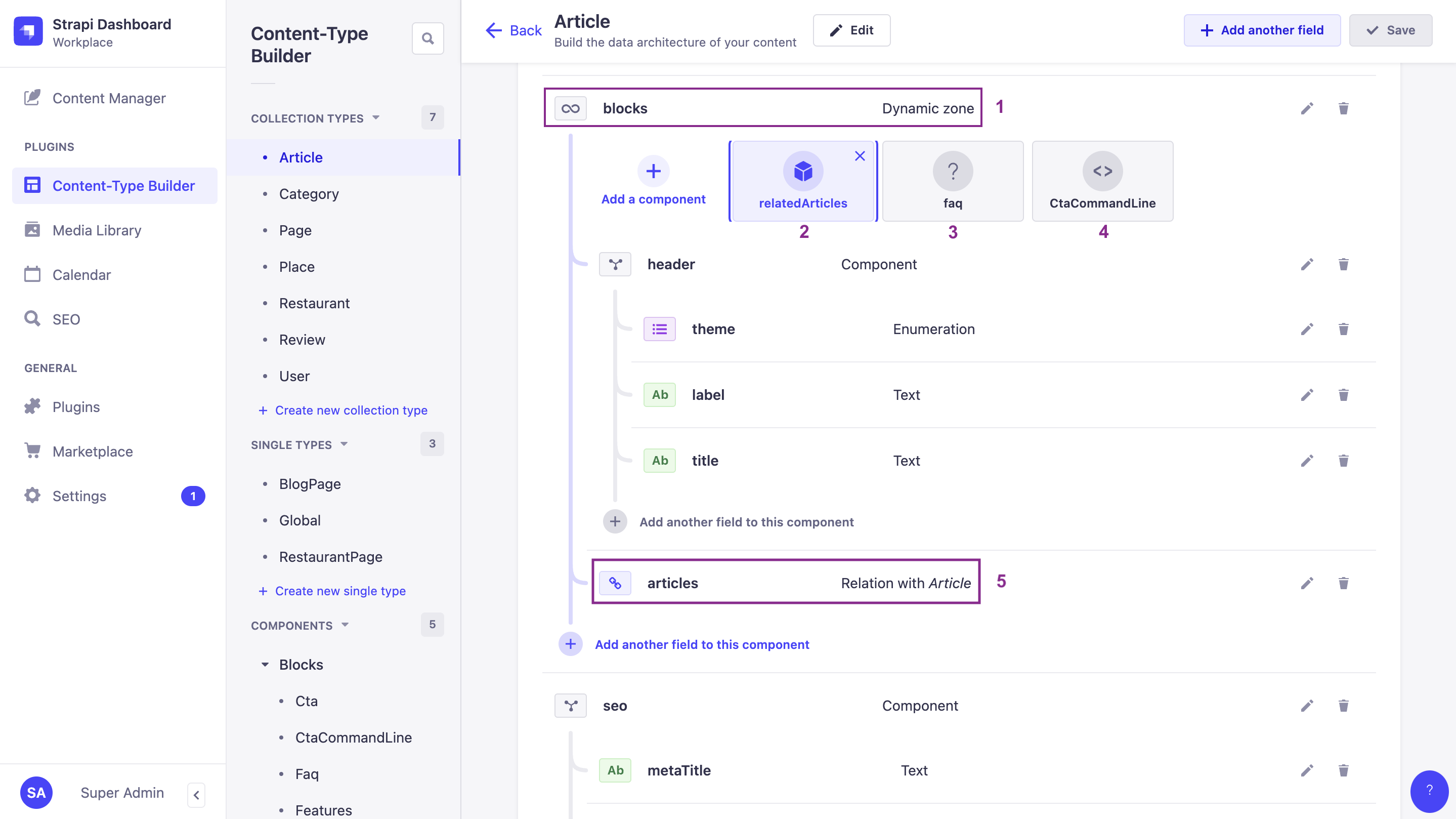
By default, none of the deeply nested fields or relations are included in the response of a `GET` request to `/api/articles`. With the appropriate populate parameters and by applying a detailed population strategy using the fragment `on` property, you can return precisely the data you need.
:::tip
The syntax for advanced query parameters can be quite complex to build manually. We recommend you use our [interactive query builder](/cms/api/rest/interactive-query-builder) tool to generate the URL. For instance, the `/api/articles?populate[blocks][on][blocks.related-articles][populate][articles][populate][0]=image&populate[blocks][on][blocks.cta-command-line][populate]=*` URL used in the following example has been generated by converting the following object using our tool:
```json
{
populate: {
blocks: { // asking to populate the blocks dynamic zone
on: { // using a detailed population strategy to explicitly define what you want
'blocks.related-articles': {
populate: {
'articles': {
populate: ['image']
}
}
},
'blocks.cta-command-line': {
populate: '*'
}
},
},
},
}
```
:::
Let's compare and explain the responses returned with some examples of a shared population strategy and a detailed population strategy:
#### Example
When we populate the `blocks` dynamic zone, we explicitly define which data to populate.
In the following example response, highlighted lines show that:
- We deeply populate the `articles` relation of the `relatedArticles` component, and even the `image` media field of the related article using fragment (`on`) population.
- But because we have only asked to populate everything for the `CtaCommandLine` component and have not defined anything for the `faq` component, no data from the `faq` component is returned.
#### GET /api/articles — Detailed population strategy for dynamic zones
Populates the blocks dynamic zone using a detailed per-component population strategy.
**Request:**
```
GET /api/articles?populate[blocks][on][blocks.related-articles][populate][articles][populate][0]=image&populate[blocks][on][blocks.cta-command-line][populate]=*
```
**Response 200 OK:**
```json
{
"data": [
{
"id": 1,
"documentId": "it9bbhcgc6mcfsqas7h1dp",
"title": "Here's why you have to try basque cuisine, according to a basque chef",
"slug": "here-s-why-you-have-to-try-basque-cuisine-according-to-a-basque-chef",
"createdAt": "2021-11-09T13:33:19.948Z",
"updatedAt": "2023-06-02T10:57:19.584Z",
"publishedAt": "2022-09-22T09:30:00.208Z",
"locale": "en",
"ckeditor_content": "// truncated content",
"blocks": [
{
"id": 2,
"documentId": "e8cnux5ejxyqrejd5addfv",
"__component": "blocks.related-articles",
"articles": {
"data": [
{
"id": 2,
"documentId": "wkgojrcg5bkz8teqx1foz7",
"title": "What are chinese hamburgers and why aren't you eating them?",
"slug": "what-are-chinese-hamburgers-and-why-aren-t-you-eating-them",
"createdAt": "2021-11-11T13:33:19.948Z",
"updatedAt": "2023-06-01T14:32:50.984Z",
"publishedAt": "2022-09-22T12:36:48.312Z",
"locale": "en",
"ckeditor_content": "// truncated content",
"image": {
"data": {
"// …": true
}
}
}
},
{
"id": 3,
"// …": true
},
{
"id": 4,
"// …": true
}
]
}
},
{
"id": 2,
"__component": "blocks.cta-command-line",
"theme": "primary",
"title": "Want to give a try to a Strapi starter?",
"text": "❤️",
"commandLine": "git clone https://github.com/strapi/nextjs-corporate-starter.git"
}
]
},
{
"id": 2,
"// …": true
},
{
"id": 3,
"documentId": "z5jnfvyuj07fogzh1kcbd3",
"title": "7 Places worth visiting for the food alone",
"slug": "7-places-worth-visiting-for-the-food-alone",
"createdAt": "2021-11-12T13:33:19.948Z",
"updatedAt": "2023-06-02T11:30:00.075Z",
"publishedAt": "2023-06-02T11:30:00.075Z",
"locale": "en",
"ckeditor_content": "// truncated content",
"blocks": [
{
"id": 1,
"documentId": "ks7xsp9fewoi0qljcz9qa0",
"__component": "blocks.related-articles",
"articles": {
"// …": true
}
},
{
"id": 1,
"documentId": "c2imt19iywk27hl2ftph7s",
"__component": "blocks.cta-command-line",
"theme": "secondary",
"title": "Want to give it a try with a brand new project?",
"text": "Up & running in seconds 🚀",
"commandLine": "npx create-strapi-app my-project --quickstart"
}
]
},
{
"id": 4,
"// …": true
}
],
"meta": {
"pagination": {
"page": 1,
"pageSize": 25,
"pageCount": 1,
"total": 4
}
}
}
```
:::tip Avoid over-populating in production
Using `populate=*` or deep population plugins can create unpredictable, costly database queries. In production, always populate explicitly and limit depth to 2-3 levels. Consider using route-level middlewares to centralize population logic. See [Building High-Performance Strapi Applications](https://strapi.io/blog/building-high-performance-strapi-applications-common-pitfalls-and-best-practices) on the Strapi blog.
:::