# Extending the Document Service behavior
> Source: https://docs.strapi.io/cms/api/document-service/middlewares
Document Service middlewares allow you to perform actions before and after Document Service methods run by registering middleware functions via `strapi.documents.use()` with access to content type context and method parameters.
The [Document Service API](/cms/api/document-service) offers the ability to extend its behavior thanks to middlewares.
Document Service middlewares allow you to perform actions before and/or after a method runs.
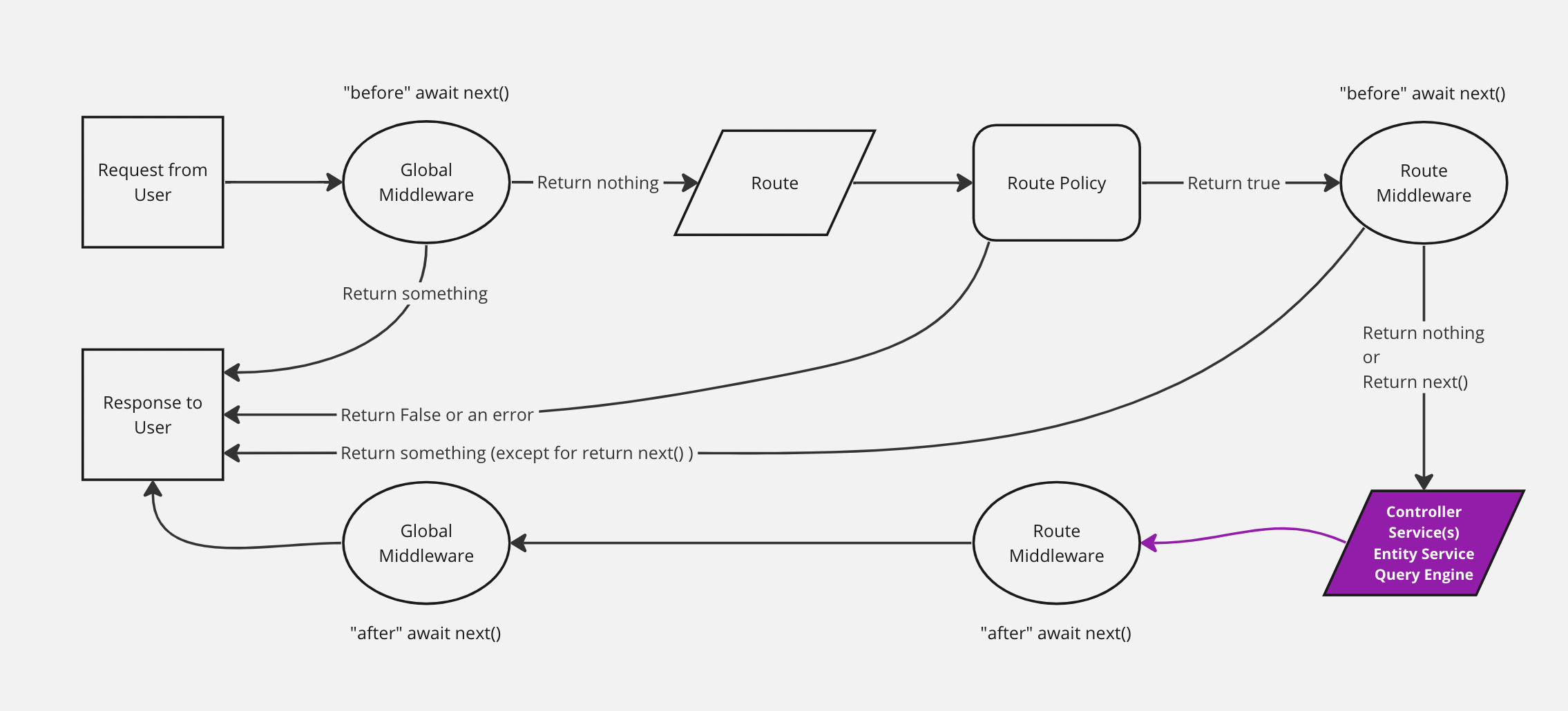 The diagram represents a simplified version of how a request travels through the Strapi back end, with the Document Service highlighted. The backend customization introduction page includes a complete, interactive diagram.
## Registering a middleware
Syntax: `strapi.documents.use(middleware)`
### Parameters
A middleware is a function that receives a context and a next function.
Syntax: `(context, next) => ReturnType`
| Parameter | Description | Type |
|-----------|---------------------------------------|------------|
| `context` | Middleware context | `Context` |
| `next` | Call the next middleware in the stack | `function` |
#### `context`
| Parameter | Description | Type |
|---------------|--------------------------------------------------------------------------------------|---------------|
| `action` | The method that is running ([see available methods](/cms/api/document-service)) | `string` |
| `params` | The method params ([see available methods](/cms/api/document-service)) | `Object` |
| `uid` | Content type unique identifier | `string` |
| `contentType` | Content type | `ContentType` |
The diagram represents a simplified version of how a request travels through the Strapi back end, with the Document Service highlighted. The backend customization introduction page includes a complete, interactive diagram.
## Registering a middleware
Syntax: `strapi.documents.use(middleware)`
### Parameters
A middleware is a function that receives a context and a next function.
Syntax: `(context, next) => ReturnType`
| Parameter | Description | Type |
|-----------|---------------------------------------|------------|
| `context` | Middleware context | `Context` |
| `next` | Call the next middleware in the stack | `function` |
#### `context`
| Parameter | Description | Type |
|---------------|--------------------------------------------------------------------------------------|---------------|
| `action` | The method that is running ([see available methods](/cms/api/document-service)) | `string` |
| `params` | The method params ([see available methods](/cms/api/document-service)) | `Object` |
| `uid` | Content type unique identifier | `string` |
| `contentType` | Content type | `ContentType` |
Examples:
The following examples show what `context` might include depending on the method called:
```js
{
uid: "api::restaurant.restaurant",
contentType: {
kind: "collectionType",
collectionName: "restaurants",
info: {
singularName: "restaurant",
pluralName: "restaurants",
displayName: "restaurant"
},
options: {
draftAndPublish: true
},
pluginOptions: {},
attributes: {
name: { /*...*/ },
description: { /*...*/ },
createdAt: { /*...*/ },
updatedAt: { /*...*/ },
publishedAt: { /*...*/ },
createdBy: { /*...*/ },
updatedBy: { /*...*/ },
locale: { /*...*/ },
},
apiName: "restaurant",
globalId: "Restaurants",
uid: "api::restaurant.restaurant",
modelType: "contentType",
modelName: "restaurant",
actions: { /*...*/ },
lifecycles: { /*...*/ },
},
action: "findOne",
params: {
documentId: 'hp7hjvrbt8rcgkmabntu0aoq',
locale: undefined,
status: "publish"
populate: { /*...*/ },
}
}
```
```js
{
uid: "api::restaurant.restaurant",
contentType: {
kind: "collectionType",
collectionName: "restaurants",
info: {
singularName: "restaurant",
pluralName: "restaurants",
displayName: "restaurant"
},
options: {
draftAndPublish: true
},
pluginOptions: {},
attributes: {
name: { /*...*/ },
description: { /*...*/ },
createdAt: { /*...*/ },
updatedAt: { /*...*/ },
publishedAt: { /*...*/ },
createdBy: { /*...*/ },
updatedBy: { /*...*/ },
locale: { /*...*/ },
},
apiName: "restaurant",
globalId: "Restaurants",
uid: "api::restaurant.restaurant",
modelType: "contentType",
modelName: "restaurant",
actions: { /*...*/ },
lifecycles: { /*...*/ },
},
action: "findMany",
params: {
filters: { /*...*/ },
status: "draft",
locale: null,
fields: ['name', 'description'],
}
}
```
```js
{
uid: "api::restaurant.restaurant",
contentType: {
kind: "collectionType",
collectionName: "restaurants",
info: {
singularName: "restaurant",
pluralName: "restaurants",
displayName: "restaurant"
},
options: {
draftAndPublish: true
},
pluginOptions: {},
attributes: {
name: { /*...*/ },
description: { /*...*/ },
createdAt: { /*...*/ },
updatedAt: { /*...*/ },
publishedAt: { /*...*/ },
createdBy: { /*...*/ },
updatedBy: { /*...*/ },
locale: { /*...*/ },
},
apiName: "restaurant",
globalId: "Restaurants",
uid: "api::restaurant.restaurant",
modelType: "contentType",
modelName: "restaurant",
actions: { /*...*/ },
lifecycles: { /*...*/ },
},
action: "create",
params: {
data: { /*...*/ },
status: "draft",
populate: { /*...*/ },
}
}
```
```js
{
uid: "api::restaurant.restaurant",
contentType: {
kind: "collectionType",
collectionName: "restaurants",
info: {
singularName: "restaurant",
pluralName: "restaurants",
displayName: "restaurant"
},
options: {
draftAndPublish: true
},
pluginOptions: {},
attributes: {
name: { /*...*/ },
description: { /*...*/ },
createdAt: { /*...*/ },
updatedAt: { /*...*/ },
publishedAt: { /*...*/ },
createdBy: { /*...*/ },
updatedBy: { /*...*/ },
locale: { /*...*/ },
},
apiName: "restaurant",
globalId: "Restaurants",
uid: "api::restaurant.restaurant",
modelType: "contentType",
modelName: "restaurant",
actions: { /*...*/ },
lifecycles: { /*...*/ },
},
action: "update",
params: {
data: { /*...*/ },
documentId: 'hp7hjvrbt8rcgkmabntu0aoq',
locale: undefined,
status: "draft"
populate: { /*...*/ },
}
}
```
```js
{
uid: "api::restaurant.restaurant",
contentType: {
kind: "collectionType",
collectionName: "restaurants",
info: {
singularName: "restaurant",
pluralName: "restaurants",
displayName: "restaurant"
},
options: {
draftAndPublish: true
},
pluginOptions: {},
attributes: {
name: { /*...*/ },
description: { /*...*/ },
createdAt: { /*...*/ },
updatedAt: { /*...*/ },
publishedAt: { /*...*/ },
createdBy: { /*...*/ },
updatedBy: { /*...*/ },
locale: { /*...*/ },
},
apiName: "restaurant",
globalId: "Restaurants",
uid: "api::restaurant.restaurant",
modelType: "contentType",
modelName: "restaurant",
actions: { /*...*/ },
lifecycles: { /*...*/ },
},
action: "delete",
params: {
data: { /*...*/ },
documentId: 'hp7hjvrbt8rcgkmabntu0aoq',
locale: "*",
populate: { /*...*/ },
}
}
```
#### `next`
`next` is a function without parameters that calls the next middleware in the stack and return its response.
**Example**
```js
strapi.documents.use((context, next) => {
return next();
});
```
### Where to register
Generaly speaking you should register your middlewares during the Strapi registration phase.
#### Users
The middleware must be registered in the general `register()` lifecycle method:
```js title="/src/index.js|ts"
module.exports = {
register({ strapi }) {
strapi.documents.use((context, next) => {
// your logic
return next();
});
},
// bootstrap({ strapi }) {},
// destroy({ strapi }) {},
};
```
#### Plugin developers
The middleware must be registered in the plugin's `register()` lifecycle method:
```js title="/(plugin-root-folder)/strapi-server.js|ts"
module.exports = {
register({ strapi }) {
strapi.documents.use((context, next) => {
// your logic
return next();
});
},
// bootstrap({ strapi }) {},
// destroy({ strapi }) {},
};
```
## Implementing a middleware
When implementing a middleware, always return the response from `next()`.
Failing to do this will break the Strapi application.
### Examples
```js
const applyTo = ['api::article.article'];
strapi.documents.use((context, next) => {
// Only run for certain content types
if (!applyTo.includes(context.uid)) {
return next();
}
// Only run for certain actions
if (['create', 'update'].includes(context.action)) {
context.params.data.fullName = `${context.params.data.firstName} ${context.params.data.lastName}`;
}
const result = await next();
// do something with the result before returning it
return result
});
```
:::strapi Lifecycle hooks
The Document Service API triggers various database lifecycle hooks based on which method is called. For a complete reference, see [Document Service API: Lifecycle hooks](/cms/migration/v4-to-v5/breaking-changes/lifecycle-hooks-document-service#table).
:::